

Komandi
Last updated:
Komandi is an innovative AI-powered command-line interface (CLI) and terminal command manager designed to significantly enhance productivity for developers and system administrators. It leverages natural language processing to help users effortlessly find, create, organize, and share complex commands, effectively eliminating the need to memorize intricate syntax or endlessly search for solutions. By centralizing command management and making it intelligently accessible, Komandi transforms the command-line experience, making it more efficient, collaborative, and less prone to errors for anyone frequently interacting with terminals across various operating systems.
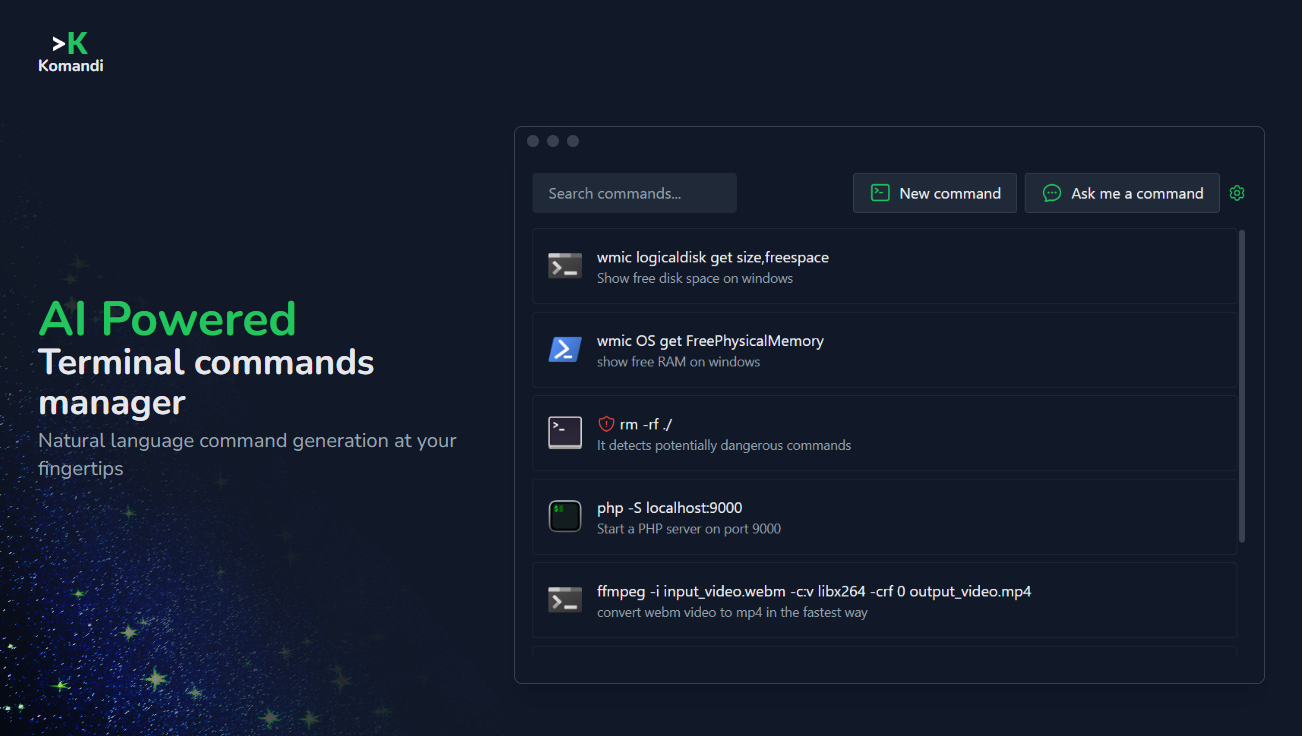
What It Does
Komandi serves as an intelligent repository for all your terminal commands, allowing users to interact with it using natural language queries to retrieve or generate specific commands. It organizes commands into collections, supports tagging, and enables sharing within teams, fostering collaboration and knowledge transfer. The tool integrates seamlessly with popular shells, providing a unified and accessible platform for managing command-line operations.
Pricing
Pricing Plans
Start managing your commands for free with limited command storage and basic features.
- Up to 50 commands
- Basic organization
- Local storage
Unlock full power with unlimited commands, AI capabilities, cloud sync, and team collaboration features.
- Unlimited commands
- AI Search
- Cloud Sync
- Team Sharing
- Dynamic Templates
- +1 more
Get all Pro features at a discounted annual rate, ideal for committed individual users.
- Unlimited commands
- AI Search
- Cloud Sync
- Team Sharing
- Dynamic Templates
- +2 more
Tailored solutions for organizations requiring centralized management and advanced team features.
- All Pro features
- Centralized billing
- Admin controls
- Dedicated support
Core Value Propositions
Boost Developer Productivity
Quickly find and execute commands using natural language, drastically reducing time spent searching or recreating complex commands. This frees up developers to focus on core tasks.
Eliminate Command Memorization
Leverage AI to recall commands you've forgotten or discover new ones, removing the cognitive load of memorizing intricate syntax and flags. Ensures you always have the right command at your fingertips.
Enhance Team Collaboration
Share validated command collections and best practices with your team, ensuring consistency and accelerating onboarding for new members. Fosters a more efficient and error-free shared workflow.
Standardize Command Workflows
Create, organize, and distribute standardized command templates, ensuring consistent execution of common tasks across projects and teams. Reduces variability and potential issues.
Use Cases
Streamlining Git Workflows
Developers can use natural language queries like 'undo last commit' or 'rebase interactive from main' to instantly get the correct Git command, saving time and preventing errors.
Server Administration Automation
System administrators can store and quickly retrieve complex server maintenance, log analysis, or network configuration commands, ensuring consistent and efficient operations.
Onboarding New Team Members
Teams can create shared collections of essential setup, build, and deployment commands, allowing new hires to get productive faster without extensive manual guidance.
Managing Cloud Infrastructure
DevOps engineers can organize and share AWS CLI, Azure CLI, or gcloud commands for managing cloud resources, ensuring standardized and secure interactions with cloud providers.
Developing Custom Scripts
Users can leverage Komandi to store snippets and templates for shell scripts, making it easier to build and reuse custom automation tools efficiently.
Technical Features & Integration
Natural Language AI Search
Find any command by describing your intent in plain English, eliminating the need to remember exact syntax or flags. This drastically speeds up command discovery.
Command Organization & Tagging
Categorize, tag, and add detailed notes to your commands, making them easy to browse and retrieve later. Keeps your command library structured and accessible.
Team Sharing & Collaboration
Securely share curated collections of commands with your team, ensuring everyone uses consistent and validated scripts. Promotes knowledge sharing and reduces errors.
Cross-Platform Compatibility
Use Komandi seamlessly across macOS, Linux, and Windows, maintaining a consistent command management experience regardless of your operating system.
Dynamic Command Templates
Create flexible command templates with placeholders for variables, enabling quick adaptation and execution for various scenarios. Enhances reusability and efficiency.
Shell Integration
Integrates with popular shells like Bash, Zsh, Fish, and PowerShell, allowing you to execute commands directly from Komandi within your preferred terminal environment.
Target Audience
Komandi primarily targets developers, system administrators, DevOps engineers, and anyone who frequently interacts with the command line. It is ideal for individuals and teams looking to streamline their terminal workflows, reduce repetitive tasks, and improve overall productivity in software development and system management.
Frequently Asked Questions
Komandi offers a free plan with limited features. Paid plans are available for additional features and capabilities. Available plans include: Free, Pro, Pro (Annual), Teams.
Komandi serves as an intelligent repository for all your terminal commands, allowing users to interact with it using natural language queries to retrieve or generate specific commands. It organizes commands into collections, supports tagging, and enables sharing within teams, fostering collaboration and knowledge transfer. The tool integrates seamlessly with popular shells, providing a unified and accessible platform for managing command-line operations.
Key features of Komandi include: Natural Language AI Search: Find any command by describing your intent in plain English, eliminating the need to remember exact syntax or flags. This drastically speeds up command discovery.. Command Organization & Tagging: Categorize, tag, and add detailed notes to your commands, making them easy to browse and retrieve later. Keeps your command library structured and accessible.. Team Sharing & Collaboration: Securely share curated collections of commands with your team, ensuring everyone uses consistent and validated scripts. Promotes knowledge sharing and reduces errors.. Cross-Platform Compatibility: Use Komandi seamlessly across macOS, Linux, and Windows, maintaining a consistent command management experience regardless of your operating system.. Dynamic Command Templates: Create flexible command templates with placeholders for variables, enabling quick adaptation and execution for various scenarios. Enhances reusability and efficiency.. Shell Integration: Integrates with popular shells like Bash, Zsh, Fish, and PowerShell, allowing you to execute commands directly from Komandi within your preferred terminal environment..
Komandi is best suited for Komandi primarily targets developers, system administrators, DevOps engineers, and anyone who frequently interacts with the command line. It is ideal for individuals and teams looking to streamline their terminal workflows, reduce repetitive tasks, and improve overall productivity in software development and system management..
Quickly find and execute commands using natural language, drastically reducing time spent searching or recreating complex commands. This frees up developers to focus on core tasks.
Leverage AI to recall commands you've forgotten or discover new ones, removing the cognitive load of memorizing intricate syntax and flags. Ensures you always have the right command at your fingertips.
Share validated command collections and best practices with your team, ensuring consistency and accelerating onboarding for new members. Fosters a more efficient and error-free shared workflow.
Create, organize, and distribute standardized command templates, ensuring consistent execution of common tasks across projects and teams. Reduces variability and potential issues.
Developers can use natural language queries like 'undo last commit' or 'rebase interactive from main' to instantly get the correct Git command, saving time and preventing errors.
System administrators can store and quickly retrieve complex server maintenance, log analysis, or network configuration commands, ensuring consistent and efficient operations.
Teams can create shared collections of essential setup, build, and deployment commands, allowing new hires to get productive faster without extensive manual guidance.
DevOps engineers can organize and share AWS CLI, Azure CLI, or gcloud commands for managing cloud resources, ensuring standardized and secure interactions with cloud providers.
Users can leverage Komandi to store snippets and templates for shell scripts, making it easier to build and reuse custom automation tools efficiently.


Get new AI tools weekly
Join readers discovering the best AI tools every week.