

Unscreen.com
Last updated:
Unscreen.com is an innovative online AI tool that automatically removes backgrounds from videos and GIFs, providing transparent footage without the need for green screens or complex editing software. It simplifies video production for various creative and professional applications, enabling users to isolate subjects quickly and efficiently. By leveraging advanced artificial intelligence, Unscreen democratizes high-quality video editing, making it accessible to creators, marketers, and businesses alike. This tool stands out by delivering professional-grade results with unparalleled ease of use, transforming previously time-consuming tasks into instant actions.
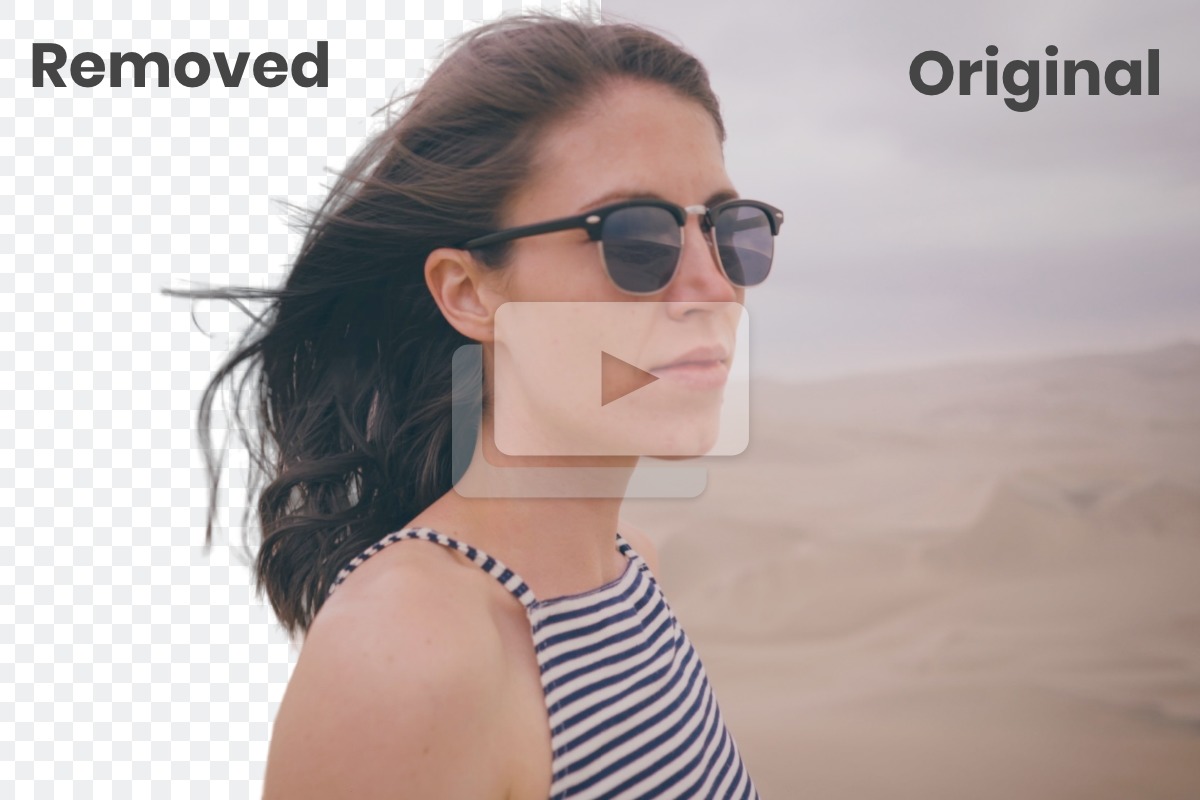
What It Does
Users upload their video or GIF, and Unscreen's AI instantly processes the footage to accurately detect and separate the foreground subject from its background. The tool then renders a new version with a completely transparent background, which can be downloaded directly. Alternatively, users can choose to replace the removed background with a solid color, a custom image, or another video clip.
Pricing
Pricing Plans
Allows users to test the service with short, watermarked, lower-resolution video clips.
- Up to 5 seconds video
- Lower resolution
- Watermarked output
- No API access
Purchase credit packs for one-time use, ideal for occasional users or specific projects, offering higher quality and features.
- Unwatermarked output
- Higher resolution
- Longer video duration
- API access
- Flexible usage
Subscription plans provide recurring credits and full features, suitable for frequent users and professionals requiring consistent access.
- Recurring credits
- Unwatermarked output
- Higher resolution
- Longer video duration
- API access
- +1 more
Core Value Propositions
Instant Background Removal
Saves hours of manual editing and rotoscoping, dramatically speeding up video production workflows for creators.
No Green Screen Needed
Eliminates the requirement for specialized equipment and studio setups, making professional video effects accessible anywhere.
Professional Quality Results
Delivers clean, accurate background removal, enhancing the visual appeal and production value of any video or GIF.
Seamless Workflow Integration
Offers API access and plugins for major editing software, fitting effortlessly into existing creative pipelines.
Use Cases
Marketing & Product Videos
Create engaging product demonstrations or advertisements by isolating products and placing them onto dynamic or custom backgrounds.
Social Media Content Creation
Produce viral-ready short-form videos and stories with transparent subjects that can be easily layered over trending media or unique backdrops.
Educational & Training Videos
Overlay instructors or presenters onto slides, screen recordings, or virtual environments for more engaging and professional tutorials.
Animated GIF Production
Generate unique transparent stickers, reaction GIFs, or animated elements for personal use or digital campaigns.
Virtual Event & Webinar Backgrounds
Place speakers into custom branded virtual environments without needing a physical green screen, enhancing online presence.
E-commerce Product Showcases
Present products cleanly and consistently across various digital platforms by removing distracting backgrounds from product videos.
Technical Features & Integration
Automatic Background Removal
AI-driven technology intelligently separates subjects from backgrounds in videos and GIFs, removing the need for green screens or manual keying.
Video and GIF Support
Process both standard video files and animated GIFs to create transparent or custom-background footage, expanding creative possibilities.
Custom Background Options
Replace transparent backgrounds with solid colors, custom images, or even other video clips directly within the tool, offering versatile design choices.
High-Quality Output
Delivers professional-grade results, ensuring clean edges and smooth transitions for polished video and GIF content.
Developer API Access
Integrate Unscreen's powerful background removal capabilities into custom applications and workflows for automated processing.
Adobe Plugin Integration
Streamline post-production with direct plugins for Adobe Premiere Pro and After Effects, enabling seamless background removal within professional editing suites.
Target Audience
This tool is ideal for content creators, social media managers, digital marketers, video editors, and animators seeking to quickly produce professional-looking video assets. It also benefits businesses and educators who need to create engaging visual content without complex editing software or specialized equipment.
Frequently Asked Questions
Unscreen.com offers a free plan with limited features. Paid plans are available for additional features and capabilities. Available plans include: Free, Credits (Pay-as-you-go), Subscription (Monthly/Yearly).
Users upload their video or GIF, and Unscreen's AI instantly processes the footage to accurately detect and separate the foreground subject from its background. The tool then renders a new version with a completely transparent background, which can be downloaded directly. Alternatively, users can choose to replace the removed background with a solid color, a custom image, or another video clip.
Key features of Unscreen.com include: Automatic Background Removal: AI-driven technology intelligently separates subjects from backgrounds in videos and GIFs, removing the need for green screens or manual keying.. Video and GIF Support: Process both standard video files and animated GIFs to create transparent or custom-background footage, expanding creative possibilities.. Custom Background Options: Replace transparent backgrounds with solid colors, custom images, or even other video clips directly within the tool, offering versatile design choices.. High-Quality Output: Delivers professional-grade results, ensuring clean edges and smooth transitions for polished video and GIF content.. Developer API Access: Integrate Unscreen's powerful background removal capabilities into custom applications and workflows for automated processing.. Adobe Plugin Integration: Streamline post-production with direct plugins for Adobe Premiere Pro and After Effects, enabling seamless background removal within professional editing suites..
Unscreen.com is best suited for This tool is ideal for content creators, social media managers, digital marketers, video editors, and animators seeking to quickly produce professional-looking video assets. It also benefits businesses and educators who need to create engaging visual content without complex editing software or specialized equipment..
Saves hours of manual editing and rotoscoping, dramatically speeding up video production workflows for creators.
Eliminates the requirement for specialized equipment and studio setups, making professional video effects accessible anywhere.
Delivers clean, accurate background removal, enhancing the visual appeal and production value of any video or GIF.
Offers API access and plugins for major editing software, fitting effortlessly into existing creative pipelines.
Create engaging product demonstrations or advertisements by isolating products and placing them onto dynamic or custom backgrounds.
Produce viral-ready short-form videos and stories with transparent subjects that can be easily layered over trending media or unique backdrops.
Overlay instructors or presenters onto slides, screen recordings, or virtual environments for more engaging and professional tutorials.
Generate unique transparent stickers, reaction GIFs, or animated elements for personal use or digital campaigns.
Place speakers into custom branded virtual environments without needing a physical green screen, enhancing online presence.
Present products cleanly and consistently across various digital platforms by removing distracting backgrounds from product videos.


Get new AI tools weekly
Join readers discovering the best AI tools every week.