

Transkriptor.com
Last updated:
Transkriptor is an advanced AI transcription service designed to convert audio and video files into accurate, editable text. Leveraging sophisticated artificial intelligence, it offers robust multi-language support, automatic speaker identification, and a comprehensive in-app editor for refining transcripts. This tool significantly streamlines workflows for professionals, students, and content creators by providing quick, reliable text versions of spoken content, enhancing accessibility and productivity.
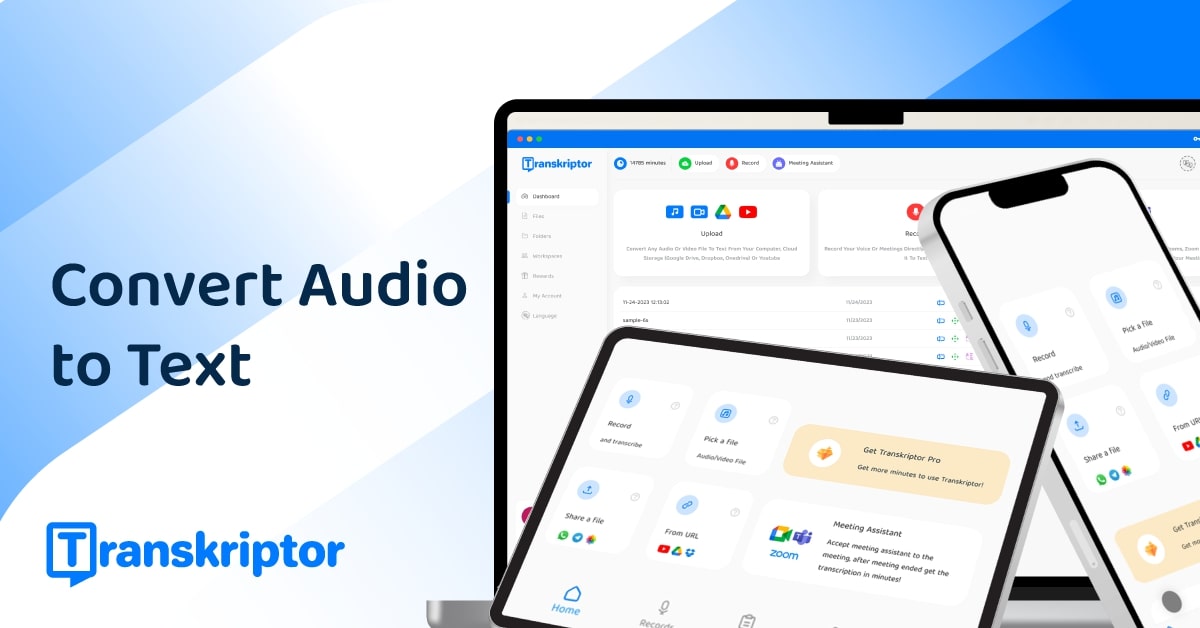
What It Does
Transkriptor processes uploaded audio or video files using AI speech-to-text algorithms to generate a written transcript. Users can then utilize the integrated editor to correct any inaccuracies, assign speaker names, and format the text. The platform also offers features like translation and summarization, making it a versatile solution for managing spoken content.
Pricing
Pricing Plans
Test Transkriptor's capabilities with a limited amount of free transcription.
- 30 minutes of free transcription
- Access to all features
Ideal for individuals with moderate transcription needs.
- 5 hours of transcription per month
- All premium features
Best for power users and small teams requiring extensive transcription services.
- 40 hours of transcription per month
- All premium features
- Priority support
Tailored for businesses with multiple users and higher volume transcription requirements.
- 50 hours per user/month
- Dedicated account manager
- Volume discounts
- Team management
Core Value Propositions
Time and Cost Savings
Automates transcription, drastically reducing the time and expense associated with manual transcription services or self-transcribing.
Enhanced Content Accessibility
Converts audio/video into text, making content searchable, editable, and accessible for individuals with hearing impairments or for different learning styles.
Increased Productivity
Streamlines workflows for professionals by quickly providing text versions of spoken content, allowing for easier analysis, editing, and repurposing.
Global Reach with Translation
Offers translation of transcripts into numerous languages, enabling content creators and businesses to reach a wider international audience.
Use Cases
Transcribing Academic Lectures
Students and educators can convert lecture recordings into text, making notes creation and revision more efficient and accessible.
Interview Transcription for Research
Researchers can quickly transcribe interviews, focus groups, and field notes, simplifying qualitative data analysis and report writing.
Generating Video Subtitles/Captions
Content creators can easily create accurate SRT/VTT files for YouTube videos, online courses, and social media, boosting accessibility and SEO.
Meeting Minutes & Conference Calls
Business professionals can transcribe team meetings, webinars, and conference calls to create accurate minutes, action items, and shareable records.
Podcast to Blog Post Conversion
Podcasters can convert audio episodes into text, which can then be edited and repurposed into blog posts, articles, or show notes.
Journalism & Media Reporting
Journalists use Transkriptor to quickly transcribe interviews, press conferences, and field recordings for accurate reporting and article drafting.
Technical Features & Integration
High-Accuracy AI Transcription
Converts audio and video to text with impressive accuracy, minimizing manual correction time and ensuring reliable output.
Multi-Language Support
Supports over 100 languages, making it accessible and useful for a global audience and diverse content needs.
Automatic Speaker Identification
Intelligently distinguishes and labels different speakers in a conversation, greatly simplifying the review process for multi-person recordings.
Integrated Text Editor
Offers a user-friendly editor within the application to easily review, correct, and format transcripts without needing external software.
Multiple Export Formats
Provides versatile export options including SRT, VTT, TXT, DOCX, and PDF, catering to various use cases from captions to documents.
AI Summarization & Rewriting
Generates concise summaries of lengthy transcripts and offers AI-powered tools to rewrite or paraphrase content, boosting efficiency.
Mobile Apps & Browser Extensions
Facilitates transcription on the go with dedicated iOS and Android apps, alongside Chrome and Edge extensions for direct web recording.
Transcript Translation
Allows users to translate their transcripts into over 100 languages, expanding the reach and utility of their content.
Target Audience
Transkriptor is ideal for journalists, researchers, students, content creators (podcasters, YouTubers), and business professionals who regularly deal with spoken content. It's particularly beneficial for anyone needing accurate text versions of meetings, interviews, lectures, podcasts, or video content, streamlining their workflow and improving accessibility.
Frequently Asked Questions
Transkriptor.com offers a free plan with limited features. Paid plans are available for additional features and capabilities. Available plans include: Free Trial, Lite, Premium, Business.
Transkriptor processes uploaded audio or video files using AI speech-to-text algorithms to generate a written transcript. Users can then utilize the integrated editor to correct any inaccuracies, assign speaker names, and format the text. The platform also offers features like translation and summarization, making it a versatile solution for managing spoken content.
Key features of Transkriptor.com include: High-Accuracy AI Transcription: Converts audio and video to text with impressive accuracy, minimizing manual correction time and ensuring reliable output.. Multi-Language Support: Supports over 100 languages, making it accessible and useful for a global audience and diverse content needs.. Automatic Speaker Identification: Intelligently distinguishes and labels different speakers in a conversation, greatly simplifying the review process for multi-person recordings.. Integrated Text Editor: Offers a user-friendly editor within the application to easily review, correct, and format transcripts without needing external software.. Multiple Export Formats: Provides versatile export options including SRT, VTT, TXT, DOCX, and PDF, catering to various use cases from captions to documents.. AI Summarization & Rewriting: Generates concise summaries of lengthy transcripts and offers AI-powered tools to rewrite or paraphrase content, boosting efficiency.. Mobile Apps & Browser Extensions: Facilitates transcription on the go with dedicated iOS and Android apps, alongside Chrome and Edge extensions for direct web recording.. Transcript Translation: Allows users to translate their transcripts into over 100 languages, expanding the reach and utility of their content..
Transkriptor.com is best suited for Transkriptor is ideal for journalists, researchers, students, content creators (podcasters, YouTubers), and business professionals who regularly deal with spoken content. It's particularly beneficial for anyone needing accurate text versions of meetings, interviews, lectures, podcasts, or video content, streamlining their workflow and improving accessibility..
Automates transcription, drastically reducing the time and expense associated with manual transcription services or self-transcribing.
Converts audio/video into text, making content searchable, editable, and accessible for individuals with hearing impairments or for different learning styles.
Streamlines workflows for professionals by quickly providing text versions of spoken content, allowing for easier analysis, editing, and repurposing.
Offers translation of transcripts into numerous languages, enabling content creators and businesses to reach a wider international audience.
Students and educators can convert lecture recordings into text, making notes creation and revision more efficient and accessible.
Researchers can quickly transcribe interviews, focus groups, and field notes, simplifying qualitative data analysis and report writing.
Content creators can easily create accurate SRT/VTT files for YouTube videos, online courses, and social media, boosting accessibility and SEO.
Business professionals can transcribe team meetings, webinars, and conference calls to create accurate minutes, action items, and shareable records.
Podcasters can convert audio episodes into text, which can then be edited and repurposed into blog posts, articles, or show notes.
Journalists use Transkriptor to quickly transcribe interviews, press conferences, and field recordings for accurate reporting and article drafting.





Get new AI tools weekly
Join readers discovering the best AI tools every week.