

Snazzy Send
Last updated:
Snazzy Send is an AI-powered copilot designed to significantly enhance productivity and streamline communication for professionals and teams. It integrates directly with popular email and meeting platforms, offering intelligent assistance for managing inboxes, drafting professional emails, summarizing meetings, extracting crucial action items, and automating follow-ups. This tool acts as a digital assistant, reducing cognitive load and ensuring efficient, high-quality communication.
What It Does
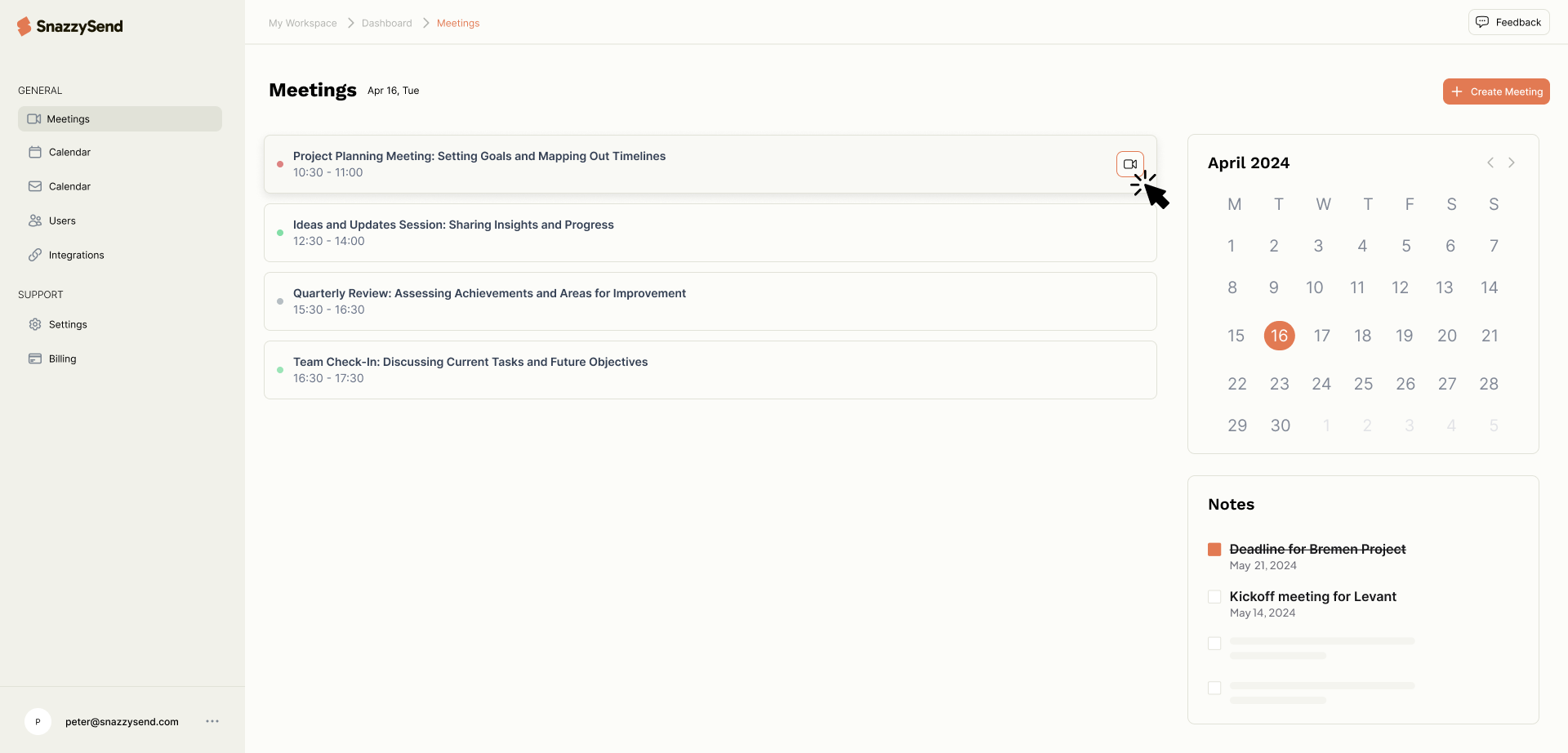
Snazzy Send functions as a browser extension that connects with email clients like Gmail and Outlook, and meeting platforms such as Zoom, Google Meet, and Microsoft Teams. It utilizes AI to analyze content, generate text for emails and replies, transcribe and summarize meeting discussions, and identify actionable tasks. The tool automates repetitive communication tasks and synthesizes key information to save users time and effort.
Pricing
Pricing Plans
A free plan to try out Snazzy Send's core functionalities with a limited number of AI credits per month.
- 10 AI credits/month
- Limited email features
- Limited meeting features
Designed for individual professionals, offering expanded AI capabilities for comprehensive email and meeting management.
- 100 AI credits/month
- Full AI Email Copilot
- Full AI Meeting Copilot
- Automated follow-ups
Tailored for teams and businesses requiring higher AI usage, priority support, and collaborative features.
- 250 AI credits/month
- All Pro features
- Priority support
- Team features
Core Value Propositions
Save Time on Communication
Reduces the hours spent drafting emails and summarizing meetings, freeing up time for more strategic tasks and core responsibilities.
Improve Communication Quality
Ensures professional, well-articulated emails and comprehensive meeting summaries, enhancing clarity and impact in all interactions.
Never Miss an Action Item
Automatically extracts and organizes action items from meetings, ensuring accountability and preventing critical tasks from falling through the cracks.
Streamline Meeting Workflows
From real-time transcription to automated follow-ups, the tool simplifies the entire lifecycle of an online meeting, making them more productive.
Use Cases
Drafting Client Outreach
Sales teams use the AI Email Copilot to quickly generate personalized, professional outreach emails, saving significant time on initial contact.
Summarizing Project Meetings
Project managers leverage the Meeting Copilot to get concise summaries of team syncs, ensuring all participants are aware of decisions and action items.
Automating Post-Meeting Follow-ups
Users can automatically generate and schedule follow-up emails after meetings, ensuring that commitments are tracked and next steps are communicated promptly.
Responding to Customer Inquiries
Support teams utilize the email drafting features to quickly compose accurate and empathetic responses to customer queries, improving service efficiency.
Preparing for Performance Reviews
Managers can review AI-generated summaries of past 1:1 meetings to recall key discussion points and action items for employee performance evaluations.
Managing Overloaded Inboxes
Professionals facing high email volumes use the inbox management features and AI summarization to quickly grasp essential information and prioritize responses.
Technical Features & Integration
AI Email Copilot
Draft, reply, rewrite, and personalize emails instantly, with options to adjust tone, check grammar, and translate content for professional communication.
AI Meeting Copilot
Provides real-time transcription, generates concise AI summaries, extracts key decisions, and identifies actionable items from your online meetings.
Automated Follow-ups
Streamlines post-meeting tasks by automatically drafting and scheduling follow-up emails based on extracted action items and decisions.
Inbox Management
Helps prioritize, categorize, and snooze emails, allowing users to manage their inbox more efficiently and focus on high-priority tasks.
Tone Adjustment & Translation
Allows users to modify the tone of their drafted emails (e.g., formal, friendly) and translate content into multiple languages directly within the editor.
Seamless Integrations
Works directly with popular platforms including Gmail, Outlook, Zoom, Google Meet, and Microsoft Teams for a unified experience.
Target Audience
Snazzy Send is ideal for busy professionals, sales teams, project managers, and anyone who frequently communicates via email and participates in online meetings. It particularly benefits individuals and teams looking to boost their productivity, improve communication quality, and reduce the time spent on administrative tasks related to emails and meetings.
Frequently Asked Questions
Snazzy Send offers a free plan with limited features. Paid plans are available for additional features and capabilities. Available plans include: Basic, Pro, Business.
Snazzy Send functions as a browser extension that connects with email clients like Gmail and Outlook, and meeting platforms such as Zoom, Google Meet, and Microsoft Teams. It utilizes AI to analyze content, generate text for emails and replies, transcribe and summarize meeting discussions, and identify actionable tasks. The tool automates repetitive communication tasks and synthesizes key information to save users time and effort.
Key features of Snazzy Send include: AI Email Copilot: Draft, reply, rewrite, and personalize emails instantly, with options to adjust tone, check grammar, and translate content for professional communication.. AI Meeting Copilot: Provides real-time transcription, generates concise AI summaries, extracts key decisions, and identifies actionable items from your online meetings.. Automated Follow-ups: Streamlines post-meeting tasks by automatically drafting and scheduling follow-up emails based on extracted action items and decisions.. Inbox Management: Helps prioritize, categorize, and snooze emails, allowing users to manage their inbox more efficiently and focus on high-priority tasks.. Tone Adjustment & Translation: Allows users to modify the tone of their drafted emails (e.g., formal, friendly) and translate content into multiple languages directly within the editor.. Seamless Integrations: Works directly with popular platforms including Gmail, Outlook, Zoom, Google Meet, and Microsoft Teams for a unified experience..
Snazzy Send is best suited for Snazzy Send is ideal for busy professionals, sales teams, project managers, and anyone who frequently communicates via email and participates in online meetings. It particularly benefits individuals and teams looking to boost their productivity, improve communication quality, and reduce the time spent on administrative tasks related to emails and meetings..
Reduces the hours spent drafting emails and summarizing meetings, freeing up time for more strategic tasks and core responsibilities.
Ensures professional, well-articulated emails and comprehensive meeting summaries, enhancing clarity and impact in all interactions.
Automatically extracts and organizes action items from meetings, ensuring accountability and preventing critical tasks from falling through the cracks.
From real-time transcription to automated follow-ups, the tool simplifies the entire lifecycle of an online meeting, making them more productive.
Sales teams use the AI Email Copilot to quickly generate personalized, professional outreach emails, saving significant time on initial contact.
Project managers leverage the Meeting Copilot to get concise summaries of team syncs, ensuring all participants are aware of decisions and action items.
Users can automatically generate and schedule follow-up emails after meetings, ensuring that commitments are tracked and next steps are communicated promptly.
Support teams utilize the email drafting features to quickly compose accurate and empathetic responses to customer queries, improving service efficiency.
Managers can review AI-generated summaries of past 1:1 meetings to recall key discussion points and action items for employee performance evaluations.
Professionals facing high email volumes use the inbox management features and AI summarization to quickly grasp essential information and prioritize responses.






Get new AI tools weekly
Join readers discovering the best AI tools every week.