

Snapclear
Last updated:
Snapclear is an AI-powered desktop application designed for high-quality image enhancement, offering robust offline processing capabilities. It excels at transforming low-resolution images into crisp, detailed visuals through advanced upscaling, and provides precise background removal directly on your device. This focus on local processing ensures user privacy and delivers rapid results, making it an ideal tool for professionals and individuals seeking powerful image manipulation without cloud dependency.
What It Does
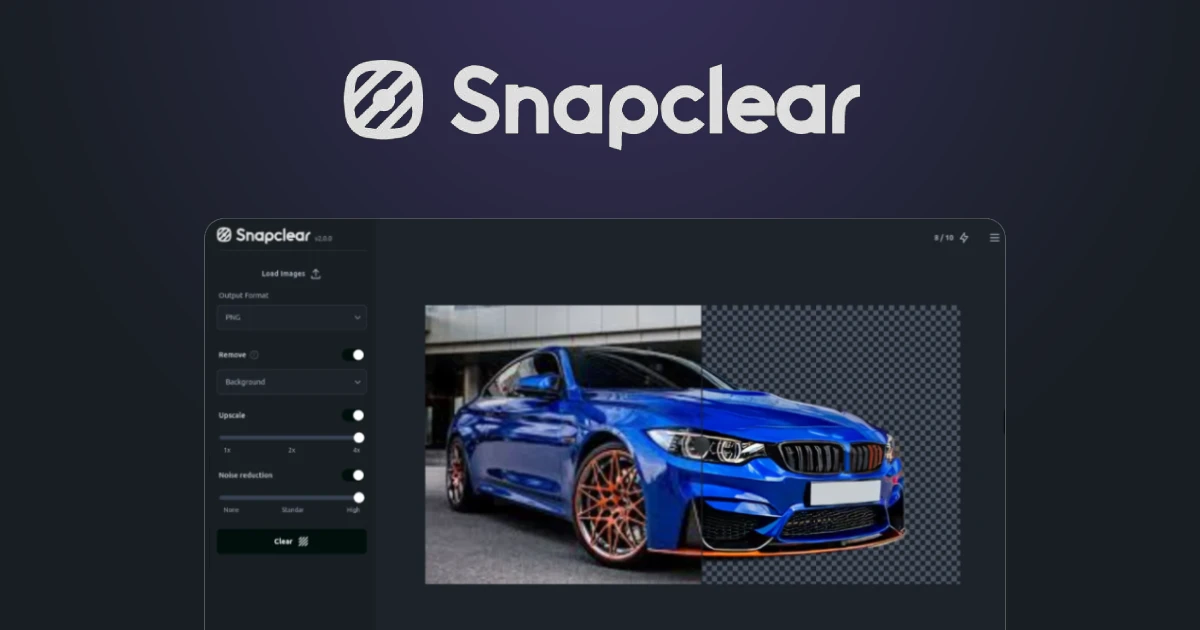
The tool primarily performs two core functions: AI-driven image upscaling and background removal. It uses advanced artificial intelligence models to intelligently add detail and increase resolution for low-quality images, often up to 8x the original size. Simultaneously, it offers precise background removal, accurately distinguishing subjects from their surroundings to create transparent backgrounds, all processed securely on the user's local machine.
Pricing
Pricing Plans
Allows users to test the core functionalities of Snapclear with a limited number of uses before committing to a purchase.
- Limited image upscales
- Limited background removals
- Full feature access for trial usage
A one-time purchase offering full, unlimited access to all features, including lifetime updates and commercial usage rights.
- Unlimited image upscaling
- Unlimited background removal
- Lifetime updates
- Priority support
- Commercial use license
Core Value Propositions
Uncompromised Data Privacy
All image processing happens locally, ensuring your sensitive photos remain on your device and are never uploaded to external servers.
Superior Image Enhancement
Leverage advanced AI to upscale images up to 8x and remove backgrounds with precision, achieving professional-grade visual quality for any project.
Fast & Efficient Workflow
Benefit from rapid offline processing and batch capabilities, significantly speeding up your image editing tasks without internet latency.
Cost-Effective Lifetime Access
Enjoy unlimited enhancements and lifetime updates with a single, one-time purchase, avoiding recurring subscription fees typical of cloud-based tools.
Reliable Offline Operation
Work on your images anytime, anywhere, without needing an internet connection, providing flexibility and uninterrupted productivity.
Use Cases
E-commerce Product Imagery
Upscale product photos to high resolution and remove backgrounds for clean, professional listings on online stores and marketplaces.
Restoring Old Photos
Enhance and sharpen pixelated or low-resolution historical photographs, bringing clarity and detail back to cherished memories.
Marketing Material Creation
Improve the quality of images used in digital ads, brochures, and presentations, ensuring crisp visuals that capture attention.
Graphic Design Workflow
Upscale source images for design projects without loss of quality and quickly isolate subjects by removing backgrounds for compositing.
Social Media Content
Enhance photos for social media posts, ensuring high-quality visuals that stand out and engage audiences, even from lower-res originals.
Print Media Preparation
Prepare images for printing by upscaling them to suitable resolutions, guaranteeing sharp and detailed output for posters, brochures, or books.
Technical Features & Integration
Offline AI Processing
All image processing occurs locally on your desktop, ensuring complete data privacy and eliminating the need for an internet connection after initial software download.
High-Quality Image Upscaling
Utilizes advanced AI models to intelligently increase image resolution and detail, transforming low-res photos into sharp, high-definition visuals up to 8x.
Precise Background Removal
Accurately identifies and removes backgrounds from images, even with complex subjects and intricate edges, delivering clean transparent outputs.
Multiple AI Models
Offers various specialized AI models optimized for different image types, allowing users to choose the best enhancement algorithm for their specific needs.
Batch Processing Capability
Efficiently processes multiple images in a single operation, saving significant time for users dealing with large volumes of photos.
Intuitive Desktop Interface
Features a user-friendly drag-and-drop interface, making it easy for both beginners and experienced users to navigate and utilize its powerful features.
Target Audience
Snapclear is most beneficial for photographers, graphic designers, e-commerce businesses, and content creators who frequently need to enhance image quality or prepare product shots. It also serves individuals looking to restore old photos or improve personal images while prioritizing privacy and local control over their data.
Frequently Asked Questions
Snapclear offers a free plan with limited features. Paid plans are available for additional features and capabilities. Available plans include: Free Trial, Snapclear Pro.
The tool primarily performs two core functions: AI-driven image upscaling and background removal. It uses advanced artificial intelligence models to intelligently add detail and increase resolution for low-quality images, often up to 8x the original size. Simultaneously, it offers precise background removal, accurately distinguishing subjects from their surroundings to create transparent backgrounds, all processed securely on the user's local machine.
Key features of Snapclear include: Offline AI Processing: All image processing occurs locally on your desktop, ensuring complete data privacy and eliminating the need for an internet connection after initial software download.. High-Quality Image Upscaling: Utilizes advanced AI models to intelligently increase image resolution and detail, transforming low-res photos into sharp, high-definition visuals up to 8x.. Precise Background Removal: Accurately identifies and removes backgrounds from images, even with complex subjects and intricate edges, delivering clean transparent outputs.. Multiple AI Models: Offers various specialized AI models optimized for different image types, allowing users to choose the best enhancement algorithm for their specific needs.. Batch Processing Capability: Efficiently processes multiple images in a single operation, saving significant time for users dealing with large volumes of photos.. Intuitive Desktop Interface: Features a user-friendly drag-and-drop interface, making it easy for both beginners and experienced users to navigate and utilize its powerful features..
Snapclear is best suited for Snapclear is most beneficial for photographers, graphic designers, e-commerce businesses, and content creators who frequently need to enhance image quality or prepare product shots. It also serves individuals looking to restore old photos or improve personal images while prioritizing privacy and local control over their data..
All image processing happens locally, ensuring your sensitive photos remain on your device and are never uploaded to external servers.
Leverage advanced AI to upscale images up to 8x and remove backgrounds with precision, achieving professional-grade visual quality for any project.
Benefit from rapid offline processing and batch capabilities, significantly speeding up your image editing tasks without internet latency.
Enjoy unlimited enhancements and lifetime updates with a single, one-time purchase, avoiding recurring subscription fees typical of cloud-based tools.
Work on your images anytime, anywhere, without needing an internet connection, providing flexibility and uninterrupted productivity.
Upscale product photos to high resolution and remove backgrounds for clean, professional listings on online stores and marketplaces.
Enhance and sharpen pixelated or low-resolution historical photographs, bringing clarity and detail back to cherished memories.
Improve the quality of images used in digital ads, brochures, and presentations, ensuring crisp visuals that capture attention.
Upscale source images for design projects without loss of quality and quickly isolate subjects by removing backgrounds for compositing.
Enhance photos for social media posts, ensuring high-quality visuals that stand out and engage audiences, even from lower-res originals.
Prepare images for printing by upscaling them to suitable resolutions, guaranteeing sharp and detailed output for posters, brochures, or books.





Get new AI tools weekly
Join readers discovering the best AI tools every week.