

Sheetai.app
Last updated:
SheetAI is an AI-powered Google Sheets add-on that brings advanced capabilities directly into your spreadsheets. It's designed to significantly streamline data manipulation, content creation, and analytical tasks by leveraging artificial intelligence. This tool stands out by embedding AI functions as custom formulas, enabling users to generate formulas, create text content, and analyze data without ever leaving their sheet environment. It's an indispensable asset for anyone looking to automate repetitive spreadsheet tasks, enhance productivity, and unlock deeper insights from their data with minimal effort.
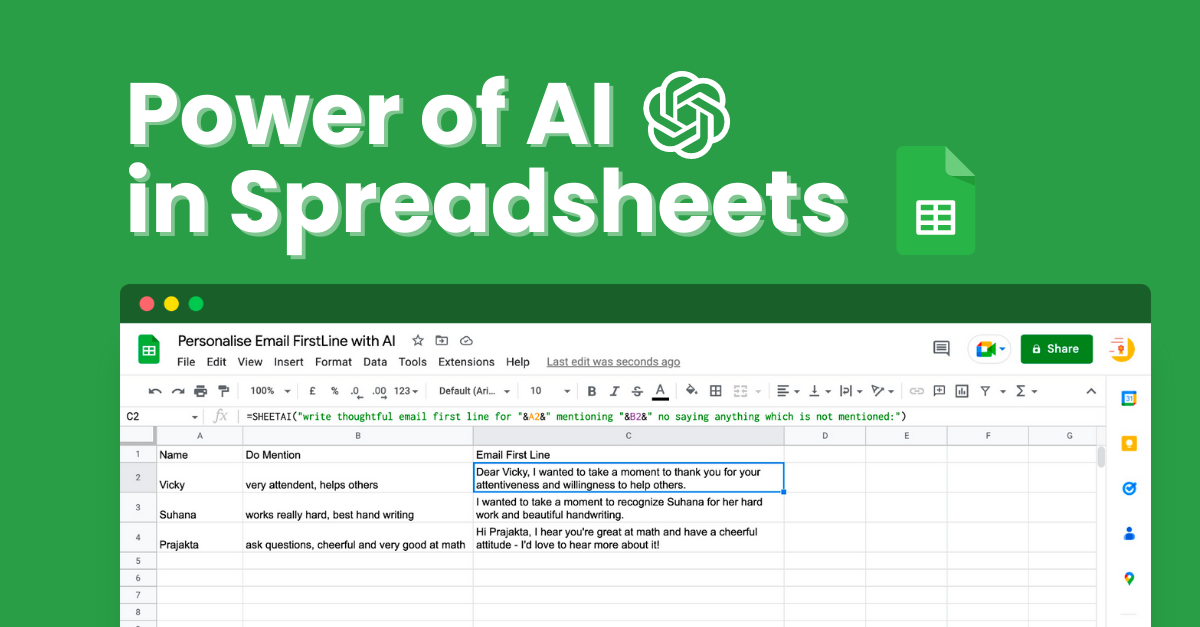
What It Does
SheetAI transforms Google Sheets into a more powerful, intelligent workspace by integrating AI directly as custom functions. Users can generate complex formulas from plain English, create various forms of text content like summaries or descriptions, and perform insightful data analysis. It essentially provides an AI assistant within each cell, simplifying tasks that traditionally require extensive manual effort or advanced spreadsheet knowledge.
Pricing
Pricing Plans
Get started with SheetAI for free with a limited number of credits to test its core functionalities.
- 100 credits per month
- Access to basic AI functions
Designed for individual power users requiring more extensive AI capabilities and support.
- 5,000 credits per month
- Access to all AI functions
- Priority support
Ideal for small teams and businesses needing substantial AI usage and collaborative features.
- 20,000 credits per month
- Access to all AI functions
- Priority support
- Team management features
Core Value Propositions
Unparalleled Spreadsheet Automation
Automates repetitive and complex tasks in Google Sheets, dramatically reducing manual effort and saving significant time for users.
AI-Powered Content & Data Generation
Generates text content and spreadsheet formulas on demand, enhancing efficiency for marketing, data entry, and analytical workflows.
Direct AI Integration in Sheets
Embeds AI functionality directly into cells via custom functions, providing seamless access to advanced tools without leaving the spreadsheet.
Enhanced Data Insights & Cleaning
Facilitates quick data analysis, categorization, and cleaning, enabling users to derive actionable insights and maintain data quality effortlessly.
Use Cases
Generate Marketing Copy
Automate the creation of product descriptions, ad copy, or social media posts directly from product data in your sheet.
Automate Formula Creation
Quickly generate complex Google Sheets formulas (e.g., VLOOKUP, SUMIFS) by simply describing what you want to achieve in plain English.
Categorize & Analyze Feedback
Process customer reviews or survey responses to categorize them by topic, sentiment, or urgency for quick insights.
Clean & Standardize Data
Format names, addresses, or other text data into a consistent format, removing errors and ensuring data quality across your lists.
Translate Multilingual Content
Translate cell content between different languages directly within your spreadsheet, useful for global communication or content management.
Summarize Long Texts
Condense lengthy articles, notes, or descriptions in cells into concise summaries for quick review and understanding.
Technical Features & Integration
Formula Generation (SHEETAI_FORMULA)
Automatically generates complex Google Sheets formulas from simple English prompts, saving users time and eliminating the need for manual formula construction.
Text Content Creation (SHEETAI_TEXT)
Enables generation, summarization, translation, rephrasing, and expansion of text content directly within spreadsheet cells, ideal for marketing copy or data enrichment.
Data Analysis & Insights (SHEETAI_ANALYZE)
Performs advanced data analysis, including entity extraction, categorization, sentiment analysis, and custom insights, transforming raw data into actionable intelligence.
Table Creation (SHEETAI_TABLE)
Structures unstructured text data into organized tables, simplifying data entry and preparation for further analysis.
Data Cleaning & Formatting (SHEETAI_FORMAT)
Automates the process of cleaning and standardizing data within cells, ensuring data consistency and accuracy across your spreadsheets.
General Purpose AI (SHEETAI_CUSTOM)
Offers a flexible AI function for any custom request, allowing users to tailor AI capabilities to unique and specific spreadsheet tasks.
Target Audience
This tool is ideal for data analysts, marketers, small business owners, educators, and anyone who regularly works with Google Sheets and seeks to enhance productivity. It particularly benefits users who need to automate repetitive tasks, generate content, or extract insights from large datasets without advanced coding skills.
Frequently Asked Questions
Sheetai.app offers a free plan with limited features. Paid plans are available for additional features and capabilities. Available plans include: Free, Pro, Business.
SheetAI transforms Google Sheets into a more powerful, intelligent workspace by integrating AI directly as custom functions. Users can generate complex formulas from plain English, create various forms of text content like summaries or descriptions, and perform insightful data analysis. It essentially provides an AI assistant within each cell, simplifying tasks that traditionally require extensive manual effort or advanced spreadsheet knowledge.
Key features of Sheetai.app include: Formula Generation (SHEETAI_FORMULA): Automatically generates complex Google Sheets formulas from simple English prompts, saving users time and eliminating the need for manual formula construction.. Text Content Creation (SHEETAI_TEXT): Enables generation, summarization, translation, rephrasing, and expansion of text content directly within spreadsheet cells, ideal for marketing copy or data enrichment.. Data Analysis & Insights (SHEETAI_ANALYZE): Performs advanced data analysis, including entity extraction, categorization, sentiment analysis, and custom insights, transforming raw data into actionable intelligence.. Table Creation (SHEETAI_TABLE): Structures unstructured text data into organized tables, simplifying data entry and preparation for further analysis.. Data Cleaning & Formatting (SHEETAI_FORMAT): Automates the process of cleaning and standardizing data within cells, ensuring data consistency and accuracy across your spreadsheets.. General Purpose AI (SHEETAI_CUSTOM): Offers a flexible AI function for any custom request, allowing users to tailor AI capabilities to unique and specific spreadsheet tasks..
Sheetai.app is best suited for This tool is ideal for data analysts, marketers, small business owners, educators, and anyone who regularly works with Google Sheets and seeks to enhance productivity. It particularly benefits users who need to automate repetitive tasks, generate content, or extract insights from large datasets without advanced coding skills..
Automates repetitive and complex tasks in Google Sheets, dramatically reducing manual effort and saving significant time for users.
Generates text content and spreadsheet formulas on demand, enhancing efficiency for marketing, data entry, and analytical workflows.
Embeds AI functionality directly into cells via custom functions, providing seamless access to advanced tools without leaving the spreadsheet.
Facilitates quick data analysis, categorization, and cleaning, enabling users to derive actionable insights and maintain data quality effortlessly.
Automate the creation of product descriptions, ad copy, or social media posts directly from product data in your sheet.
Quickly generate complex Google Sheets formulas (e.g., VLOOKUP, SUMIFS) by simply describing what you want to achieve in plain English.
Process customer reviews or survey responses to categorize them by topic, sentiment, or urgency for quick insights.
Format names, addresses, or other text data into a consistent format, removing errors and ensuring data quality across your lists.
Translate cell content between different languages directly within your spreadsheet, useful for global communication or content management.
Condense lengthy articles, notes, or descriptions in cells into concise summaries for quick review and understanding.




Get new AI tools weekly
Join readers discovering the best AI tools every week.