

Rewritebar
Last updated:
Rewritebar is a sophisticated macOS AI writing assistant engineered to seamlessly integrate across virtually all applications, significantly enhancing the clarity, impact, and accuracy of written communication. It provides a comprehensive suite of AI-powered features, including advanced grammar and style correction, intelligent rephrasing for diverse tones, text summarization, and accurate multi-language translation for over 100 languages. Crucially, Rewritebar prioritizes user privacy by offering optional local AI model support via Ollama, ensuring sensitive data remains on the user's device while streamlining the writing process directly within their native macOS workflow. This tool is an essential asset for Mac users who seek to elevate their written output across all digital platforms, from crafting professional emails to developing complex documents.
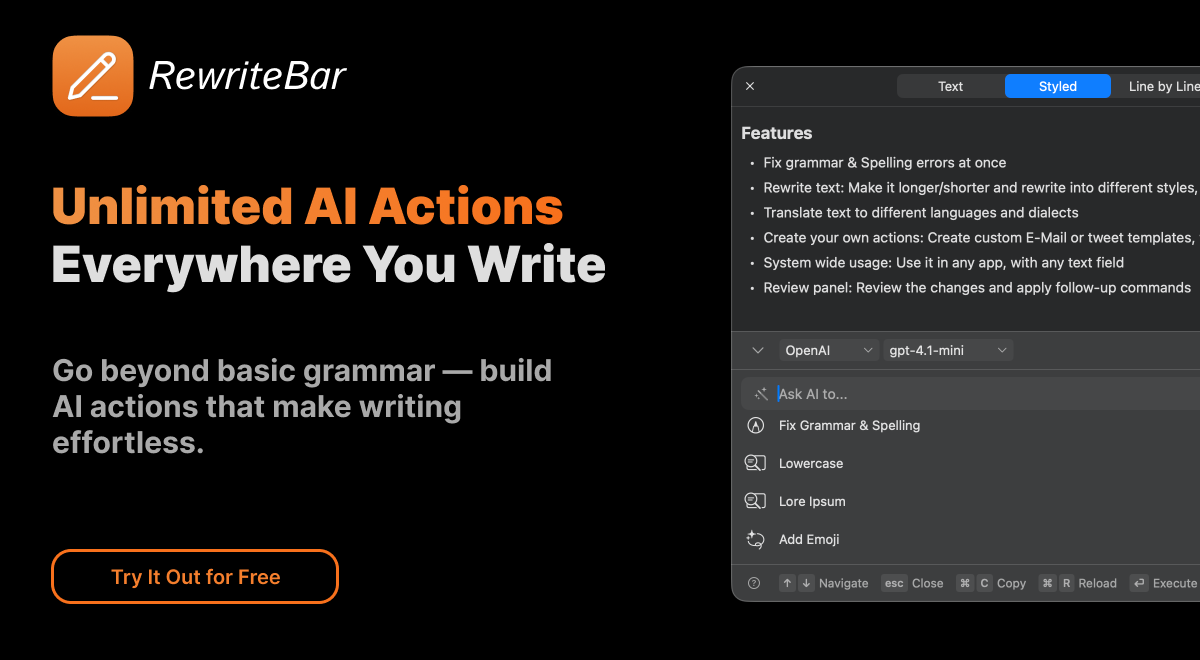
What It Does
Rewritebar functions as a system-wide AI writing companion for macOS, allowing users to invoke its capabilities with a simple shortcut in any application. It analyzes selected text to provide real-time corrections for grammar and style, intelligently rephrases sentences to alter tone or improve clarity, and accurately translates content between over 100 languages. Furthermore, it can summarize lengthy texts, expand on ideas, and execute custom AI prompts, all while respecting user privacy through optional local AI processing.
Pricing
Pricing Plans
A one-time purchase granting permanent access to Rewritebar's full feature set, including one year of free updates.
- All current features
- Free updates for 1 year
- Lifetime use
Core Value Propositions
Enhanced Writing Quality & Efficiency
Refine grammar, style, and tone effortlessly, accelerating the writing process and ensuring professional-grade communication.
Uncompromised Data Privacy
Leverage optional local AI models to process text on-device, guaranteeing that sensitive information remains secure and private.
Seamless macOS Workflow Integration
Access powerful AI writing tools system-wide in any application, eliminating the need to switch between different programs.
Versatile Writing Capabilities
From grammar checks and rephrasing to summarization and translation, it covers a broad spectrum of writing needs in one tool.
Cost-Effective One-Time Purchase
Gain lifetime access to advanced AI writing assistance with a single payment, avoiding recurring subscription fees.
Use Cases
Drafting Professional Emails
Refine email clarity, correct grammar, and adjust the tone to be more formal or concise before sending.
Refining Academic Papers
Check for grammatical errors, improve sentence structure, summarize research findings, and expand on theoretical concepts.
Translating Foreign Language Content
Instantly translate text from web pages, documents, or chat messages into your preferred language without leaving the application.
Summarizing Lengthy Documents
Quickly condense long articles, reports, or meeting notes into key takeaways for efficient information consumption.
Generating Creative Content Ideas
Utilize custom prompts or idea expansion features to overcome writer's block and develop unique content for blogs or social media.
Improving Social Media Posts
Craft engaging and error-free captions or tweets, adjusting the tone to be more persuasive or casual for different audiences.
Technical Features & Integration
Advanced Grammar & Style Correction
Corrects grammatical errors, improves sentence structure, and refines writing style to enhance overall readability and professionalism.
Intelligent Rephrasing & Tone Adjustment
Rewrites text for clarity, changes the tone (e.g., formal to casual), simplifies complex sentences, or expands on brief ideas.
Multi-language Translation
Instantly translates text between over 100 languages, facilitating seamless global communication directly within any application.
Optional Local AI with Ollama
Supports running AI models directly on your Mac via Ollama, ensuring maximum data privacy as no text leaves your device.
System-wide macOS Integration
Works across all macOS applications, from email clients to word processors, invoked via a convenient keyboard shortcut for an uninterrupted workflow.
Custom AI Prompts
Allows users to create and save their own AI commands and prompts, enabling highly personalized and efficient writing tasks.
Text Summarization
Condenses lengthy articles, documents, or emails into concise summaries, saving time and aiding quick comprehension.
Idea Expansion
Helps users elaborate on short notes or bullet points, transforming them into comprehensive paragraphs or detailed explanations.
Target Audience
Rewritebar is designed for any Mac user who regularly writes and seeks to improve their written communication, including professionals drafting emails and reports, students refining academic papers, and content creators developing articles or social media posts. It is particularly beneficial for those who prioritize data privacy and desire an integrated AI writing assistant within their existing macOS ecosystem.
Frequently Asked Questions
Rewritebar is a paid tool. Available plans include: Lifetime License.
Rewritebar functions as a system-wide AI writing companion for macOS, allowing users to invoke its capabilities with a simple shortcut in any application. It analyzes selected text to provide real-time corrections for grammar and style, intelligently rephrases sentences to alter tone or improve clarity, and accurately translates content between over 100 languages. Furthermore, it can summarize lengthy texts, expand on ideas, and execute custom AI prompts, all while respecting user privacy through optional local AI processing.
Key features of Rewritebar include: Advanced Grammar & Style Correction: Corrects grammatical errors, improves sentence structure, and refines writing style to enhance overall readability and professionalism.. Intelligent Rephrasing & Tone Adjustment: Rewrites text for clarity, changes the tone (e.g., formal to casual), simplifies complex sentences, or expands on brief ideas.. Multi-language Translation: Instantly translates text between over 100 languages, facilitating seamless global communication directly within any application.. Optional Local AI with Ollama: Supports running AI models directly on your Mac via Ollama, ensuring maximum data privacy as no text leaves your device.. System-wide macOS Integration: Works across all macOS applications, from email clients to word processors, invoked via a convenient keyboard shortcut for an uninterrupted workflow.. Custom AI Prompts: Allows users to create and save their own AI commands and prompts, enabling highly personalized and efficient writing tasks.. Text Summarization: Condenses lengthy articles, documents, or emails into concise summaries, saving time and aiding quick comprehension.. Idea Expansion: Helps users elaborate on short notes or bullet points, transforming them into comprehensive paragraphs or detailed explanations..
Rewritebar is best suited for Rewritebar is designed for any Mac user who regularly writes and seeks to improve their written communication, including professionals drafting emails and reports, students refining academic papers, and content creators developing articles or social media posts. It is particularly beneficial for those who prioritize data privacy and desire an integrated AI writing assistant within their existing macOS ecosystem..
Refine grammar, style, and tone effortlessly, accelerating the writing process and ensuring professional-grade communication.
Leverage optional local AI models to process text on-device, guaranteeing that sensitive information remains secure and private.
Access powerful AI writing tools system-wide in any application, eliminating the need to switch between different programs.
From grammar checks and rephrasing to summarization and translation, it covers a broad spectrum of writing needs in one tool.
Gain lifetime access to advanced AI writing assistance with a single payment, avoiding recurring subscription fees.
Refine email clarity, correct grammar, and adjust the tone to be more formal or concise before sending.
Check for grammatical errors, improve sentence structure, summarize research findings, and expand on theoretical concepts.
Instantly translate text from web pages, documents, or chat messages into your preferred language without leaving the application.
Quickly condense long articles, reports, or meeting notes into key takeaways for efficient information consumption.
Utilize custom prompts or idea expansion features to overcome writer's block and develop unique content for blogs or social media.
Craft engaging and error-free captions or tweets, adjusting the tone to be more persuasive or casual for different audiences.





Get new AI tools weekly
Join readers discovering the best AI tools every week.