
Piny
Last updated:
Piny is an innovative in-IDE visual editor designed to streamline UI development for modern web frameworks like Astro, React, Next.js, and Tailwind CSS. It empowers developers to directly edit components visually within their VS Code environment, dramatically accelerating the UI building process. By offering a live preview and writing changes directly to the codebase, Piny minimizes context switching and fosters seamless collaboration between designers and developers, making it a powerful tool for rapid front-end development and maintaining design system consistency.
What It Does
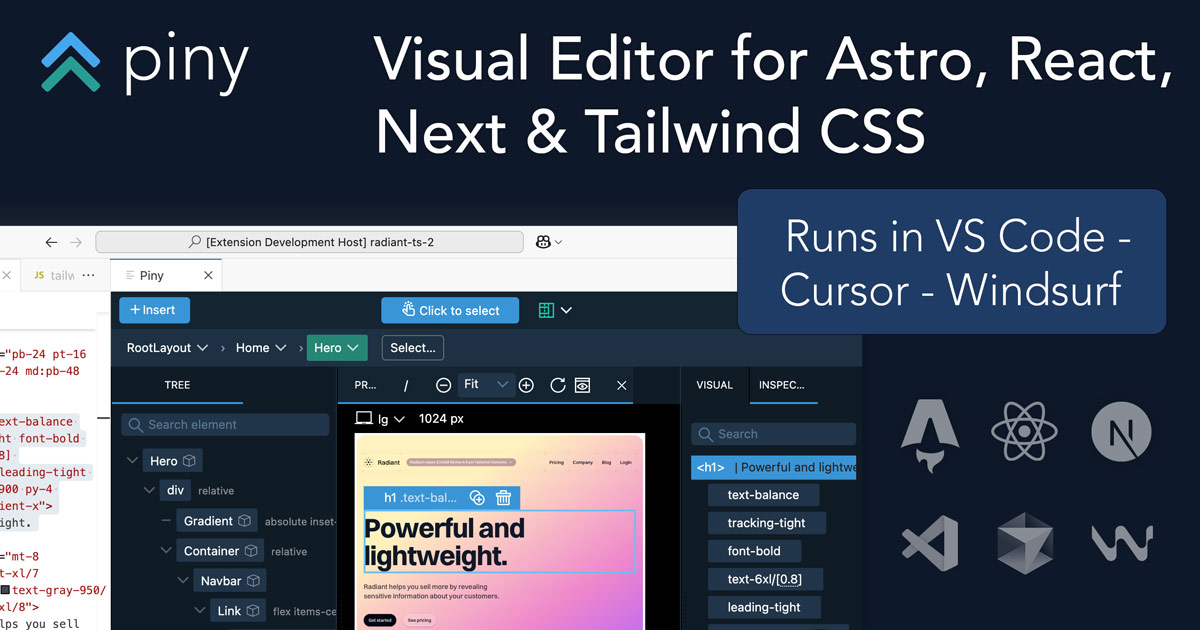
Piny functions as a VS Code extension that provides a visual editing interface for web components. Developers can open their existing Astro, React, or Next.js projects and visually interact with components, modifying their props, children, and Tailwind CSS styles through a user-friendly GUI. All visual manipulations are translated directly into clean, readable code within the developer's files, eliminating the need for manual code translation from design mockups.
Pricing
Pricing Plans
Piny is currently in Beta and offered free of charge for a limited time, providing full access to its features.
- Visual Component Editing
- Live Preview
- Astro, React, Next.js, Tailwind CSS Support
- VS Code Integration
- Direct Code Updates
Core Value Propositions
Accelerated UI Development
Visually edit components and see immediate code updates, drastically reducing the time spent on UI iteration and implementation.
Reduced Context Switching
Perform design and development tasks within a single IDE environment, eliminating the need to switch between design tools and code editors.
Improved Designer-Developer Handoff
Facilitates clearer communication and faster implementation of design changes by allowing direct visual manipulation of components in code.
Enhanced Code Consistency
Helps maintain adherence to design systems and coding standards by generating clean, framework-specific code from visual edits.
Use Cases
Rapid UI Prototyping
Quickly assemble and iterate on new user interfaces or sections using visual editing, speeding up initial design and development phases.
Building Component Libraries
Visually create, configure, and manage reusable UI components for design systems, ensuring consistency and ease of use.
Implementing Design Systems
Ensure strict adherence to design system guidelines by visually manipulating components that automatically generate compliant code.
Iterating on Existing UIs
Make quick adjustments to props, styles, or component structure on live projects with immediate visual feedback, streamlining maintenance.
Onboarding New Developers
Provide a more intuitive way for new team members to understand and modify existing UI components without deep initial code knowledge.
Cross-Functional Team Collaboration
Enable designers and developers to work more closely on UI implementation, reducing miscommunication and speeding up design-to-code cycles.
Technical Features & Integration
Direct Visual Component Editing
Edit component props, children, and styles directly through an intuitive visual interface within your IDE. This eliminates manual coding for basic UI adjustments, speeding up development.
Real-time Live Preview
See your UI changes instantly reflected in a live preview pane. This immediate feedback loop allows for faster iteration and reduces guesswork during development.
Multi-Framework Support
Seamlessly works with popular modern web frameworks including Astro, React, Next.js, and Tailwind CSS. This versatility makes it suitable for a wide range of projects and teams.
Native VS Code Integration
Operates as a VS Code extension, providing a familiar and integrated development experience. Developers can leverage their existing IDE setup without external applications.
Automatic Code Generation
All visual edits are translated into clean, readable, and production-ready code directly in your project files. This ensures consistency and reduces manual coding errors.
Inspect & Manipulate Props/Styles
Visually inspect and modify component props and Tailwind CSS classes. This simplifies complex styling and data binding, making components easier to configure.
Target Audience
Piny is primarily designed for frontend developers, UI/UX engineers, and full-stack developers working with Astro, React, Next.js, and Tailwind CSS. It's particularly beneficial for teams focused on rapid prototyping, maintaining design systems, and improving collaboration between design and development. Agencies and in-house development teams seeking to accelerate UI iteration cycles will find significant value.
Frequently Asked Questions
Yes, Piny is completely free to use. Available plans include: Beta Access.
Piny functions as a VS Code extension that provides a visual editing interface for web components. Developers can open their existing Astro, React, or Next.js projects and visually interact with components, modifying their props, children, and Tailwind CSS styles through a user-friendly GUI. All visual manipulations are translated directly into clean, readable code within the developer's files, eliminating the need for manual code translation from design mockups.
Key features of Piny include: Direct Visual Component Editing: Edit component props, children, and styles directly through an intuitive visual interface within your IDE. This eliminates manual coding for basic UI adjustments, speeding up development.. Real-time Live Preview: See your UI changes instantly reflected in a live preview pane. This immediate feedback loop allows for faster iteration and reduces guesswork during development.. Multi-Framework Support: Seamlessly works with popular modern web frameworks including Astro, React, Next.js, and Tailwind CSS. This versatility makes it suitable for a wide range of projects and teams.. Native VS Code Integration: Operates as a VS Code extension, providing a familiar and integrated development experience. Developers can leverage their existing IDE setup without external applications.. Automatic Code Generation: All visual edits are translated into clean, readable, and production-ready code directly in your project files. This ensures consistency and reduces manual coding errors.. Inspect & Manipulate Props/Styles: Visually inspect and modify component props and Tailwind CSS classes. This simplifies complex styling and data binding, making components easier to configure..
Piny is best suited for Piny is primarily designed for frontend developers, UI/UX engineers, and full-stack developers working with Astro, React, Next.js, and Tailwind CSS. It's particularly beneficial for teams focused on rapid prototyping, maintaining design systems, and improving collaboration between design and development. Agencies and in-house development teams seeking to accelerate UI iteration cycles will find significant value..
Visually edit components and see immediate code updates, drastically reducing the time spent on UI iteration and implementation.
Perform design and development tasks within a single IDE environment, eliminating the need to switch between design tools and code editors.
Facilitates clearer communication and faster implementation of design changes by allowing direct visual manipulation of components in code.
Helps maintain adherence to design systems and coding standards by generating clean, framework-specific code from visual edits.
Quickly assemble and iterate on new user interfaces or sections using visual editing, speeding up initial design and development phases.
Visually create, configure, and manage reusable UI components for design systems, ensuring consistency and ease of use.
Ensure strict adherence to design system guidelines by visually manipulating components that automatically generate compliant code.
Make quick adjustments to props, styles, or component structure on live projects with immediate visual feedback, streamlining maintenance.
Provide a more intuitive way for new team members to understand and modify existing UI components without deep initial code knowledge.
Enable designers and developers to work more closely on UI implementation, reducing miscommunication and speeding up design-to-code cycles.





Get new AI tools weekly
Join readers discovering the best AI tools every week.