
Makeayo
Last updated:
Makeayo is a powerful, AI-powered generative art tool designed for Windows desktops, enabling users to create unique digital artwork directly on their local machines. It offers extensive creative control, supporting offline generation, custom Stable Diffusion models, and advanced editing features. This tool caters to artists, designers, and enthusiasts seeking privacy, performance, and fine-grained command over their AI art creation process without reliance on cloud services. Its desktop-first approach ensures data privacy and eliminates recurring cloud costs for core functionalities, making it a compelling choice for local AI art generation.
What It Does
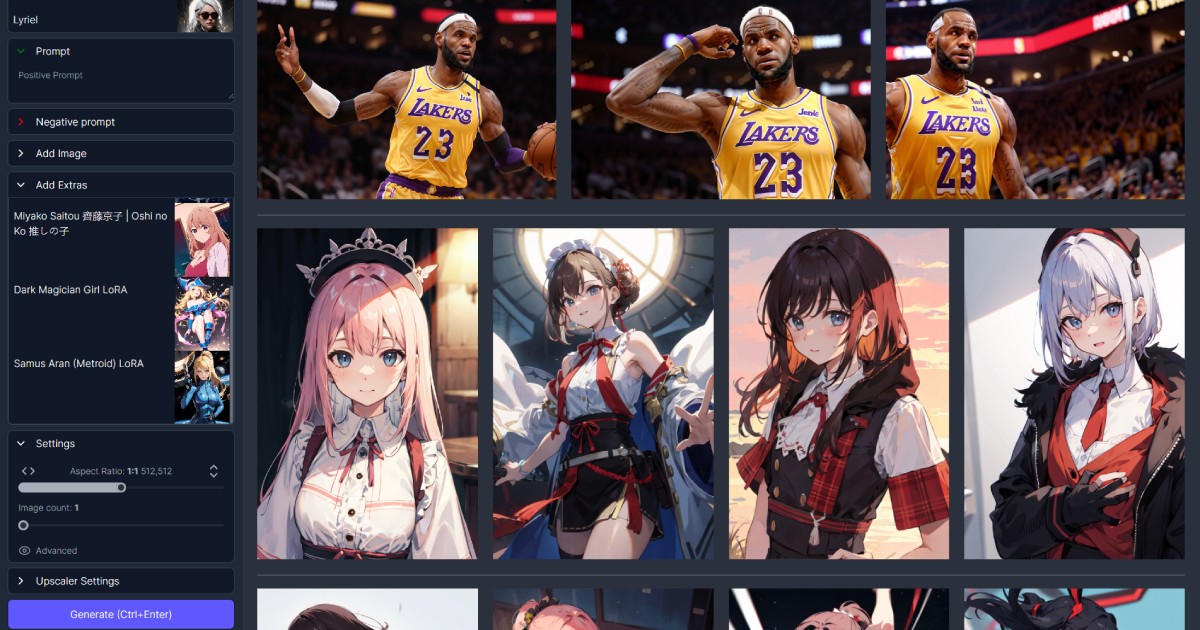
Makeayo allows users to generate high-quality images from text prompts or existing images using various AI models like Stable Diffusion, all processed locally on their Windows PC. It integrates comprehensive editing capabilities, including inpainting, outpainting, and ControlNet, empowering users to refine and customize their generated artwork with precision. The application also provides tools for managing custom models and organizing generated art within an intuitive interface.
Pricing
Pricing Plans
Free version for casual use.
- Basic AI art generation
- Limited features
One-time purchase for full access to all features and commercial rights.
- Advanced AI features
- Unlimited generation
- Full creative control
- Commercial use
Key Features
The tool distinguishes itself with robust offline generation capabilities, ensuring privacy and speed without cloud dependencies. It provides extensive creative control through detailed prompt engineering, support for a wide array of custom AI models (like LoRAs and Textual Inversions), and advanced image manipulation tools such as ControlNet and layer-based editing. Additionally, Makeayo supports image-to-image transformations and batch generation, streamlining the creative workflow for diverse artistic projects.
Target Audience
Makeayo is ideal for digital artists, graphic designers, illustrators, and hobbyists who require robust AI art generation capabilities on their desktop. It particularly benefits users prioritizing privacy, local processing, and deep control over AI models and image manipulation, as well as those looking to avoid cloud subscription fees.
Value Proposition
Makeayo's unique value lies in its desktop-first approach, offering completely offline AI image generation that ensures user privacy and eliminates recurring cloud costs. It empowers creators with unparalleled control over the artistic process through advanced features like ControlNet and custom model support, solving the problem of limited customization and data privacy often found in cloud-based alternatives while leveraging local hardware for optimal performance.
Use Cases
Creating concept art, generating illustrations, designing digital assets, personal art projects, exploring AI-driven visual creativity.
Frequently Asked Questions
Makeayo offers a free plan with limited features. Paid plans are available for additional features and capabilities. Available plans include: Makeayo Free, Makeayo Pro.
Makeayo allows users to generate high-quality images from text prompts or existing images using various AI models like Stable Diffusion, all processed locally on their Windows PC. It integrates comprehensive editing capabilities, including inpainting, outpainting, and ControlNet, empowering users to refine and customize their generated artwork with precision. The application also provides tools for managing custom models and organizing generated art within an intuitive interface.
Makeayo is best suited for Makeayo is ideal for digital artists, graphic designers, illustrators, and hobbyists who require robust AI art generation capabilities on their desktop. It particularly benefits users prioritizing privacy, local processing, and deep control over AI models and image manipulation, as well as those looking to avoid cloud subscription fees..






Get new AI tools weekly
Join readers discovering the best AI tools every week.