

Macgpt
Last updated:
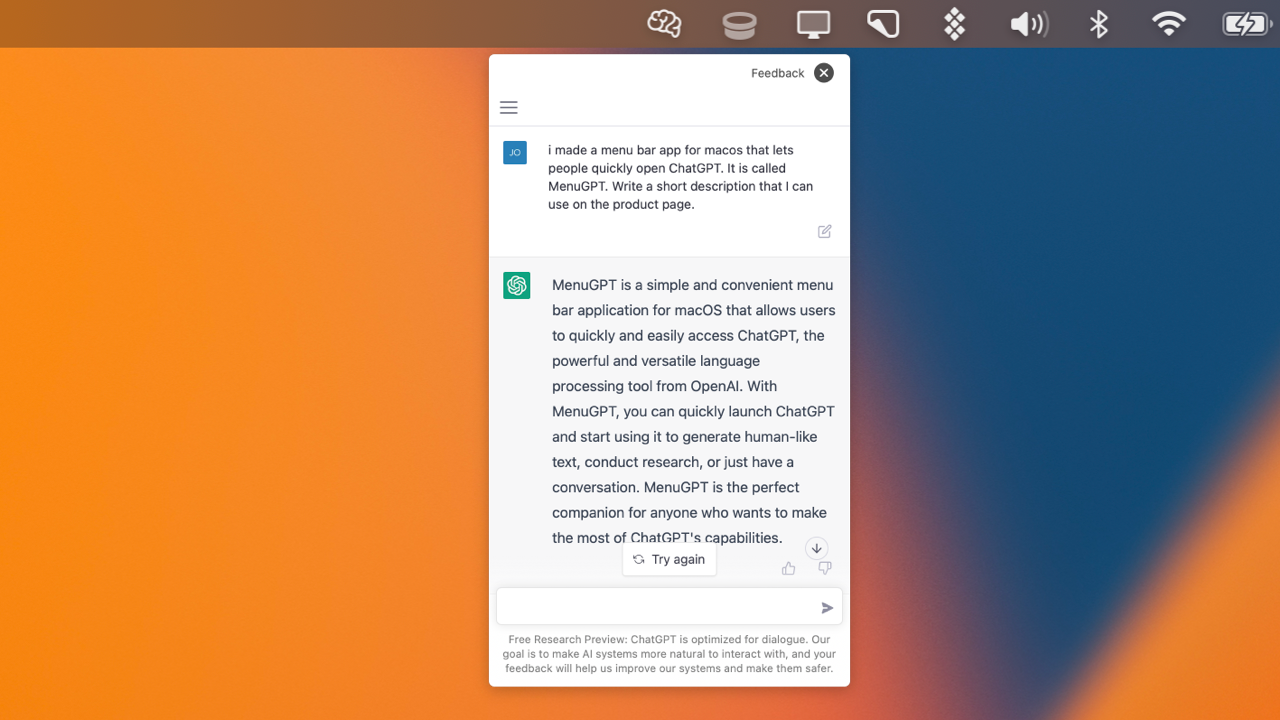
MacGPT is a robust, free, and open-source macOS application designed to integrate ChatGPT's powerful AI capabilities directly into the user's workflow. It provides seamless access to various AI models (including OpenAI's ChatGPT and local alternatives) through convenient hotkeys, inline prompts, and a persistent menu bar icon. This tool significantly enhances productivity by allowing users to leverage AI for text generation, summarization, editing, and more, without ever leaving their current application.
What It Does
MacGPT acts as a universal client for AI language models on macOS, enabling users to interact with AI through system-wide hotkeys or by selecting text in any application for inline processing. It channels user queries to configured AI models, displaying responses directly on the desktop or within the context of the selected text. This integration streamlines tasks that traditionally require switching to a web browser or a dedicated AI application.
Pricing
Pricing Plans
Full access to all MacGPT features for free, requiring only an OpenAI API key for OpenAI models (which may incur costs from OpenAI).
- Global Hotkey Access
- Inline Prompts
- Menu Bar Integration
- OpenAI API Key Support
- Local Model Support (Oobabooga)
- +3 more
Core Value Propositions
Seamless AI Integration
Access AI from anywhere on your Mac instantly, saving time and reducing context switching. This fosters a more fluid and efficient workflow.
Enhanced Productivity
Leverage AI for tasks like writing, coding, and summarization directly within your current application, significantly boosting daily output and efficiency.
Customizable & Flexible
Tailor your AI experience with custom prompts and support for various models, adapting the tool to your specific needs and preferences.
Free & Open-Source
Benefit from powerful AI integration without any cost for the client application, ensuring accessibility and community-driven development.
Use Cases
Drafting & Editing Text
Select text in an email client or document, use an inline prompt to have ChatGPT rewrite, expand, or summarize it, saving time on content creation.
Code Generation & Debugging
In an IDE, select a function or a problem description, then use MacGPT to generate code snippets, explain complex logic, or suggest bug fixes.
Summarizing Articles & Documents
Highlight a long article in your browser or a PDF viewer, and instantly get a concise summary from ChatGPT, aiding quick comprehension and research.
Brainstorming & Idea Generation
Use the global hotkey to quickly open ChatGPT and brainstorm ideas for projects, marketing campaigns, or creative writing, without interrupting your main task.
Learning & Explaining Concepts
Select complex terms or paragraphs in educational materials and ask ChatGPT for simpler explanations or definitions, enhancing learning efficiency.
Translating & Rephrasing
Highlight text in any language and use MacGPT to translate it, or select a sentence and ask it to rephrase it in a different tone or style.
Technical Features & Integration
Global Hotkey Access
Instantly bring up a ChatGPT interface with a customizable keyboard shortcut, making AI accessible from any application on your Mac.
Inline Text Prompts
Select any text in any application, press a hotkey, and prompt ChatGPT to summarize, rewrite, or analyze it directly in place, boosting contextual productivity.
Menu Bar Integration
Quickly access ChatGPT conversations and settings from a discreet icon in your macOS menu bar, ensuring AI is always just a click away.
Multiple AI Model Support
Connect to OpenAI's ChatGPT (including GPT-4) via API keys, or integrate with self-hosted local models like Oobabooga for enhanced flexibility and data privacy.
Custom Prompt Management
Create, save, and organize personalized prompts for recurring tasks, allowing for consistent and efficient AI interactions tailored to specific needs.
Conversation History
Maintain a record of past interactions, enabling users to revisit previous queries and responses for reference or to continue ongoing discussions.
Markdown Formatting
AI responses are presented with full Markdown support, ensuring readability and proper formatting for code, lists, and emphasized text.
Open-Source & Free
Benefit from a transparent, community-driven application that is completely free to use, offering cost-effective AI integration without subscription fees for the client.
Target Audience
MacGPT is ideal for macOS users who frequently interact with AI language models, including writers, developers, students, and general productivity enthusiasts. Anyone looking to seamlessly integrate AI assistance into their daily computing tasks without workflow interruptions will find significant value.
Frequently Asked Questions
Yes, Macgpt is completely free to use. Available plans include: Free.
MacGPT acts as a universal client for AI language models on macOS, enabling users to interact with AI through system-wide hotkeys or by selecting text in any application for inline processing. It channels user queries to configured AI models, displaying responses directly on the desktop or within the context of the selected text. This integration streamlines tasks that traditionally require switching to a web browser or a dedicated AI application.
Key features of Macgpt include: Global Hotkey Access: Instantly bring up a ChatGPT interface with a customizable keyboard shortcut, making AI accessible from any application on your Mac.. Inline Text Prompts: Select any text in any application, press a hotkey, and prompt ChatGPT to summarize, rewrite, or analyze it directly in place, boosting contextual productivity.. Menu Bar Integration: Quickly access ChatGPT conversations and settings from a discreet icon in your macOS menu bar, ensuring AI is always just a click away.. Multiple AI Model Support: Connect to OpenAI's ChatGPT (including GPT-4) via API keys, or integrate with self-hosted local models like Oobabooga for enhanced flexibility and data privacy.. Custom Prompt Management: Create, save, and organize personalized prompts for recurring tasks, allowing for consistent and efficient AI interactions tailored to specific needs.. Conversation History: Maintain a record of past interactions, enabling users to revisit previous queries and responses for reference or to continue ongoing discussions.. Markdown Formatting: AI responses are presented with full Markdown support, ensuring readability and proper formatting for code, lists, and emphasized text.. Open-Source & Free: Benefit from a transparent, community-driven application that is completely free to use, offering cost-effective AI integration without subscription fees for the client..
Macgpt is best suited for MacGPT is ideal for macOS users who frequently interact with AI language models, including writers, developers, students, and general productivity enthusiasts. Anyone looking to seamlessly integrate AI assistance into their daily computing tasks without workflow interruptions will find significant value..
Access AI from anywhere on your Mac instantly, saving time and reducing context switching. This fosters a more fluid and efficient workflow.
Leverage AI for tasks like writing, coding, and summarization directly within your current application, significantly boosting daily output and efficiency.
Tailor your AI experience with custom prompts and support for various models, adapting the tool to your specific needs and preferences.
Benefit from powerful AI integration without any cost for the client application, ensuring accessibility and community-driven development.
Select text in an email client or document, use an inline prompt to have ChatGPT rewrite, expand, or summarize it, saving time on content creation.
In an IDE, select a function or a problem description, then use MacGPT to generate code snippets, explain complex logic, or suggest bug fixes.
Highlight a long article in your browser or a PDF viewer, and instantly get a concise summary from ChatGPT, aiding quick comprehension and research.
Use the global hotkey to quickly open ChatGPT and brainstorm ideas for projects, marketing campaigns, or creative writing, without interrupting your main task.
Select complex terms or paragraphs in educational materials and ask ChatGPT for simpler explanations or definitions, enhancing learning efficiency.
Highlight text in any language and use MacGPT to translate it, or select a sentence and ask it to rephrase it in a different tone or style.



Get new AI tools weekly
Join readers discovering the best AI tools every week.