
Grafychat
Last updated:
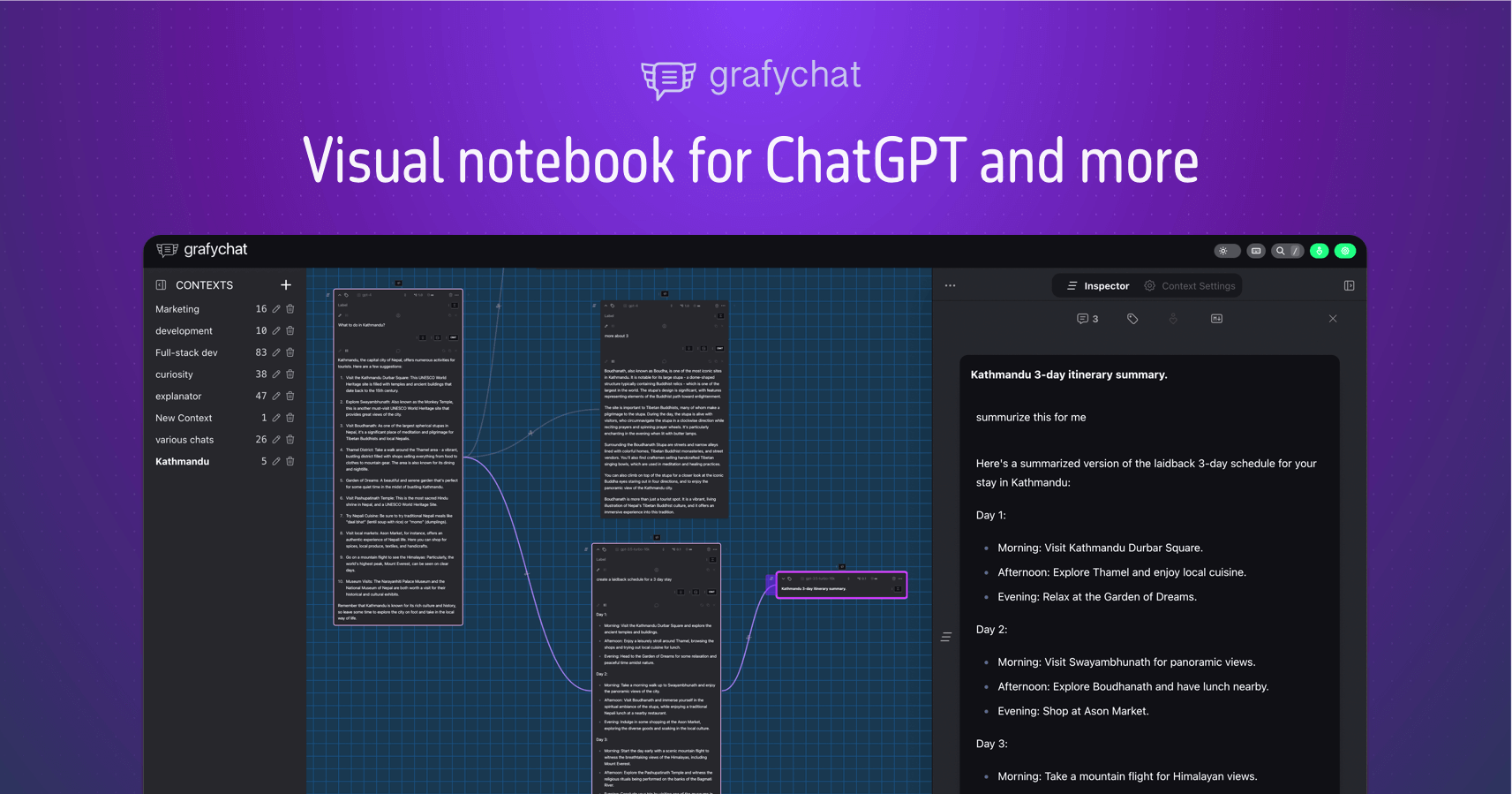
Grafychat is an innovative, privacy-focused AI chat client that redefines how users interact with large language models. It features a unique canvas-based interface, allowing for visual organization of conversations, ideas, and notes in a spatial layout. By supporting multiple leading AI models such as GPT-4, Claude, Llama, and Gemini, Grafychat empowers users to leverage diverse AI capabilities for varied tasks while ensuring their data remains private and local. This tool is ideal for individuals and teams engaged in brainstorming, creative development, project planning, and any work requiring organized, multi-faceted AI assistance.
What It Does
Grafychat provides a desktop application where users can interact with various AI models within a dynamic, infinite canvas. Instead of linear chat histories, conversations, ideas, and prompts are represented as movable nodes that can be connected, grouped, and spatially arranged. Users bring their own API keys for LLMs, ensuring that chat data never leaves their local device or Grafychat's control, maintaining a high level of privacy and security.
Pricing
Pricing Plans
Basic access to Grafychat's core features, ideal for trying out the canvas interface and multi-model capabilities with limited usage.
- 3 Canvases
- 3 LLM Providers
- Community Support
Full access to all Grafychat features, including unlimited canvases and LLM providers, designed for power users and professionals.
- Unlimited Canvases
- Unlimited LLM Providers
- Priority Support
- Advanced Features
The same powerful Pro features, billed annually at a discounted rate, offering a cost-effective solution for long-term users.
- Unlimited Canvases
- Unlimited LLM Providers
- Priority Support
- Advanced Features
Core Value Propositions
Visual Idea Organization
Move beyond linear chats to visually map and connect AI-generated ideas, making complex information easier to understand and manage.
Enhanced Data Privacy
Keep all your AI interactions and sensitive data local and encrypted, ensuring complete control and peace of mind over your information.
Flexible Multi-Model Access
Seamlessly switch between leading AI models like GPT, Claude, and Gemini to get the best output for any specific task or query.
Streamlined Creative Workflows
Organize brainstorming sessions, content outlines, and project plans visually, accelerating creative and strategic development.
Offline Productivity
Work on your AI projects and ideas even without an internet connection, ensuring continuous productivity and access to your data.
Use Cases
Brainstorming & Idea Generation
Generate and visually organize diverse ideas from multiple AI models on a canvas, connecting related concepts for comprehensive brainstorming sessions.
Project Planning & Management
Outline project phases, tasks, and dependencies using AI, arranging them spatially on a canvas for clear visual project roadmaps.
Content Creation & Outlining
Develop articles, scripts, or marketing copy by iteratively prompting different AIs and organizing the generated content and outlines visually.
Research Synthesis & Organization
Collect, summarize, and connect research findings from AI models, creating a visual knowledge base for complex topics with privacy.
Software Design & Architecture
Use AI to generate code snippets, architectural ideas, or documentation, organizing these components on a canvas for a holistic system view.
Personal Knowledge Management
Store and connect personal notes, learning insights, and AI interactions on a private canvas, creating a dynamic and searchable knowledge graph.
Technical Features & Integration
AI Canvas Interface
Visually organize AI chats, ideas, and notes on an infinite canvas, allowing for spatial arrangement and connection of information. This aids in complex thought organization.
Multi-LLM Support
Access and switch between various leading AI models like GPT-4, Claude, Llama, and Gemini within the same interface. This provides flexibility to choose the best model for any task.
Privacy-First Architecture
All data is processed locally and encrypted by default, with no user data sent to Grafychat servers. Users retain full control over their information, enhancing security.
Local-First Operation
The application functions primarily offline after initial setup, storing data on the user's device. This ensures accessibility and performance without constant internet dependency.
Prompt Library & Management
Save, categorize, and reuse frequently used prompts to streamline workflows and ensure consistency across AI interactions. This boosts efficiency for repetitive tasks.
Markdown & Rich Text Editing
Format AI-generated content and personal notes with markdown support for clear, structured, and readable documentation directly within the canvas. This improves content quality.
Folder Organization
Manage and categorize different AI canvases into folders, making it easy to navigate and find specific projects or topics. This enhances project management.
Desktop Application
Available as a native application for Windows, macOS, and Linux, providing a robust and optimized experience with system-level integration. This ensures stability and performance.
Target Audience
Grafychat is designed for knowledge workers, creatives, project managers, and researchers who require an organized and private environment for interacting with AI. It particularly benefits individuals and teams who frequently brainstorm, manage complex projects, or generate and synthesize information across multiple AI models, valuing both organizational clarity and data security.
Frequently Asked Questions
Grafychat offers a free plan with limited features. Paid plans are available for additional features and capabilities. Available plans include: Free Forever, Pro, Pro (Annual).
Grafychat provides a desktop application where users can interact with various AI models within a dynamic, infinite canvas. Instead of linear chat histories, conversations, ideas, and prompts are represented as movable nodes that can be connected, grouped, and spatially arranged. Users bring their own API keys for LLMs, ensuring that chat data never leaves their local device or Grafychat's control, maintaining a high level of privacy and security.
Key features of Grafychat include: AI Canvas Interface: Visually organize AI chats, ideas, and notes on an infinite canvas, allowing for spatial arrangement and connection of information. This aids in complex thought organization.. Multi-LLM Support: Access and switch between various leading AI models like GPT-4, Claude, Llama, and Gemini within the same interface. This provides flexibility to choose the best model for any task.. Privacy-First Architecture: All data is processed locally and encrypted by default, with no user data sent to Grafychat servers. Users retain full control over their information, enhancing security.. Local-First Operation: The application functions primarily offline after initial setup, storing data on the user's device. This ensures accessibility and performance without constant internet dependency.. Prompt Library & Management: Save, categorize, and reuse frequently used prompts to streamline workflows and ensure consistency across AI interactions. This boosts efficiency for repetitive tasks.. Markdown & Rich Text Editing: Format AI-generated content and personal notes with markdown support for clear, structured, and readable documentation directly within the canvas. This improves content quality.. Folder Organization: Manage and categorize different AI canvases into folders, making it easy to navigate and find specific projects or topics. This enhances project management.. Desktop Application: Available as a native application for Windows, macOS, and Linux, providing a robust and optimized experience with system-level integration. This ensures stability and performance..
Grafychat is best suited for Grafychat is designed for knowledge workers, creatives, project managers, and researchers who require an organized and private environment for interacting with AI. It particularly benefits individuals and teams who frequently brainstorm, manage complex projects, or generate and synthesize information across multiple AI models, valuing both organizational clarity and data security..
Move beyond linear chats to visually map and connect AI-generated ideas, making complex information easier to understand and manage.
Keep all your AI interactions and sensitive data local and encrypted, ensuring complete control and peace of mind over your information.
Seamlessly switch between leading AI models like GPT, Claude, and Gemini to get the best output for any specific task or query.
Organize brainstorming sessions, content outlines, and project plans visually, accelerating creative and strategic development.
Work on your AI projects and ideas even without an internet connection, ensuring continuous productivity and access to your data.
Generate and visually organize diverse ideas from multiple AI models on a canvas, connecting related concepts for comprehensive brainstorming sessions.
Outline project phases, tasks, and dependencies using AI, arranging them spatially on a canvas for clear visual project roadmaps.
Develop articles, scripts, or marketing copy by iteratively prompting different AIs and organizing the generated content and outlines visually.
Collect, summarize, and connect research findings from AI models, creating a visual knowledge base for complex topics with privacy.
Use AI to generate code snippets, architectural ideas, or documentation, organizing these components on a canvas for a holistic system view.
Store and connect personal notes, learning insights, and AI interactions on a private canvas, creating a dynamic and searchable knowledge graph.





Get new AI tools weekly
Join readers discovering the best AI tools every week.