
Free Outline Image Generator
Last updated:
Free Outline Image Generator is an intuitive online AI tool designed to streamline image preparation by automatically removing backgrounds and adding customizable outlines. It's ideal for enhancing visuals for diverse applications, from e-commerce product listings to social media content and personal projects, making subjects stand out with a professional touch. This tool simplifies a complex editing process, making high-quality, professional-looking images accessible to users without advanced design skills or expensive software. Its ease of use and immediate results make it a valuable asset for quick visual enhancements.
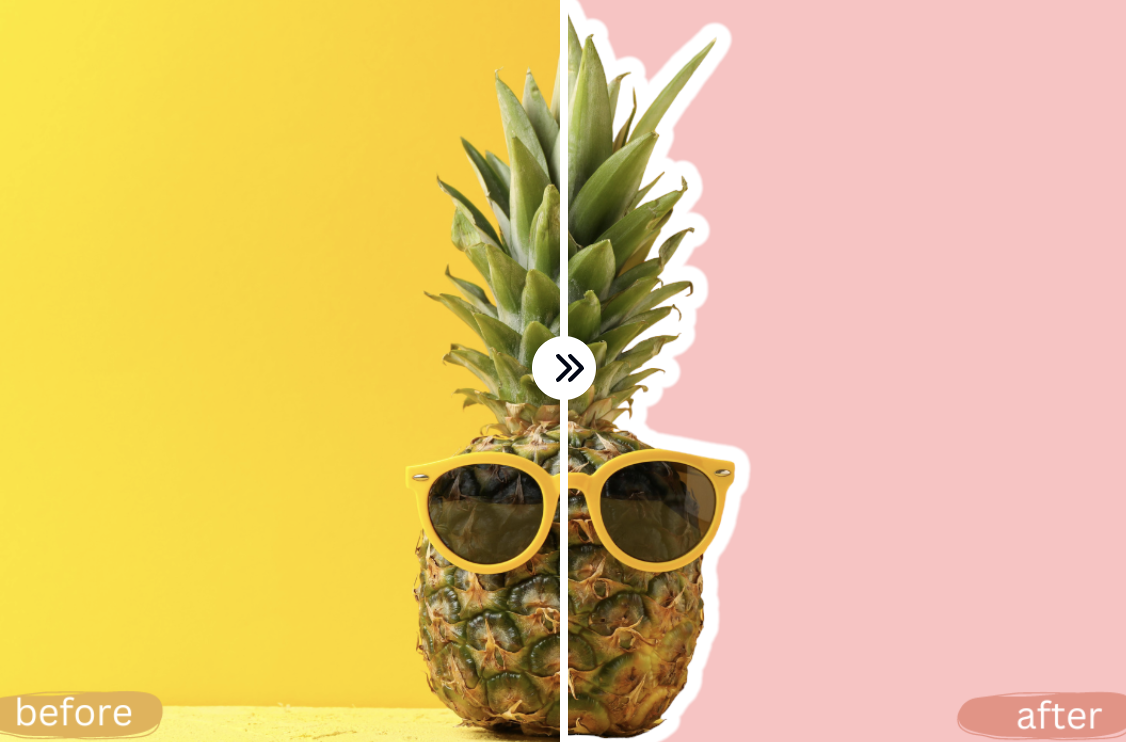
What It Does
The tool leverages AI to automatically detect and isolate the main subject in an uploaded image, precisely removing its background. Following this, it applies a customizable outline around the isolated subject. Users can then adjust the outline's color and thickness to suit their specific design needs before downloading the final image with a transparent background.
Pricing
Pricing Plans
Access all features of the Free Outline Image Generator without any cost or limitations, allowing for unlimited image processing and downloads.
- AI Background Removal
- Customizable Outline Color
- Adjustable Outline Thickness
- High-Quality PNG Output
- No Watermarks
Core Value Propositions
Effortless Image Transformation
Quickly converts standard images into outlined, transparent assets without manual effort. This saves time and reduces the learning curve associated with complex image editors.
Professional Visuals, No Cost
Delivers high-quality, professional-grade outlined images entirely free. This is ideal for budget-conscious individuals and small businesses to enhance their visual content effectively.
Streamlined Creative Workflow
Simplifies the process of preparing images for various platforms and purposes, from e-commerce to social media. This allows users to focus more on creative content and less on tedious editing tasks.
Accessibility for All Skill Levels
Designed for intuitive use, requiring no prior graphic design experience or technical knowledge. This makes advanced image editing techniques available to a wider audience.
Use Cases
Product Photography Enhancement
E-commerce sellers use it to quickly process product images, adding outlines to make items pop on white or colored backgrounds, significantly improving listing appeal and conversion rates.
Social Media Content Creation
Marketers and content creators leverage the tool to generate engaging visuals for posts, stories, and ads by outlining subjects for a distinctive, professional look that captures attention.
Website & UI Design Assets
Web designers can create unique icons, banners, or featured images with outlined elements that integrate seamlessly into various website layouts, enhancing visual hierarchy.
Personal Branding & Avatars
Individuals create personalized profile pictures or avatars with custom outlines, adding a unique and memorable touch to their online presence across all digital platforms.
Presentation & Educational Graphics
Educators and presenters utilize it to highlight key figures or objects in slides and documents, making complex information more digestible and visually appealing for their audience.
Technical Features & Integration
AI Background Removal
Automatically detects and precisely removes backgrounds from images, isolating the main subject with high accuracy. This saves significant manual editing time and ensures clean cutouts.
Customizable Outline Color
Allows users to select any color for the outline using an interactive color picker. This enables branding consistency or creative expression to match specific design requirements.
Adjustable Outline Thickness
Provides a slider to easily control the width of the outline from subtle borders to bold accents. This offers flexibility for different visual styles and applications.
High-Quality PNG Output
Downloads the processed image as a PNG file with a transparent background, ensuring optimal quality and versatility. This is crucial for layering images onto various backdrops.
Target Audience
This tool is primarily beneficial for content creators, e-commerce sellers, social media managers, graphic designers, and small business owners. Anyone needing to quickly prepare product photos, create engaging social media posts, or design marketing materials with clean, outlined subjects will find it valuable.
Frequently Asked Questions
Yes, Free Outline Image Generator is completely free to use. Available plans include: Free.
The tool leverages AI to automatically detect and isolate the main subject in an uploaded image, precisely removing its background. Following this, it applies a customizable outline around the isolated subject. Users can then adjust the outline's color and thickness to suit their specific design needs before downloading the final image with a transparent background.
Key features of Free Outline Image Generator include: AI Background Removal: Automatically detects and precisely removes backgrounds from images, isolating the main subject with high accuracy. This saves significant manual editing time and ensures clean cutouts.. Customizable Outline Color: Allows users to select any color for the outline using an interactive color picker. This enables branding consistency or creative expression to match specific design requirements.. Adjustable Outline Thickness: Provides a slider to easily control the width of the outline from subtle borders to bold accents. This offers flexibility for different visual styles and applications.. High-Quality PNG Output: Downloads the processed image as a PNG file with a transparent background, ensuring optimal quality and versatility. This is crucial for layering images onto various backdrops..
Free Outline Image Generator is best suited for This tool is primarily beneficial for content creators, e-commerce sellers, social media managers, graphic designers, and small business owners. Anyone needing to quickly prepare product photos, create engaging social media posts, or design marketing materials with clean, outlined subjects will find it valuable..
Quickly converts standard images into outlined, transparent assets without manual effort. This saves time and reduces the learning curve associated with complex image editors.
Delivers high-quality, professional-grade outlined images entirely free. This is ideal for budget-conscious individuals and small businesses to enhance their visual content effectively.
Simplifies the process of preparing images for various platforms and purposes, from e-commerce to social media. This allows users to focus more on creative content and less on tedious editing tasks.
Designed for intuitive use, requiring no prior graphic design experience or technical knowledge. This makes advanced image editing techniques available to a wider audience.
E-commerce sellers use it to quickly process product images, adding outlines to make items pop on white or colored backgrounds, significantly improving listing appeal and conversion rates.
Marketers and content creators leverage the tool to generate engaging visuals for posts, stories, and ads by outlining subjects for a distinctive, professional look that captures attention.
Web designers can create unique icons, banners, or featured images with outlined elements that integrate seamlessly into various website layouts, enhancing visual hierarchy.
Individuals create personalized profile pictures or avatars with custom outlines, adding a unique and memorable touch to their online presence across all digital platforms.
Educators and presenters utilize it to highlight key figures or objects in slides and documents, making complex information more digestible and visually appealing for their audience.




Get new AI tools weekly
Join readers discovering the best AI tools every week.