

EmailTriager
Last updated:
EmailTriager is an intelligent AI tool designed to significantly streamline email management by automating the drafting of personalized replies. Operating seamlessly as a browser extension within existing email clients like Gmail and Outlook, it meticulously learns a user's unique writing style, tone, and preferences from past communications. This allows it to generate contextually relevant, on-brand, and highly personalized email responses, drastically reducing the time and mental effort spent on manual email composition while ensuring consistent and professional communication.
What It Does
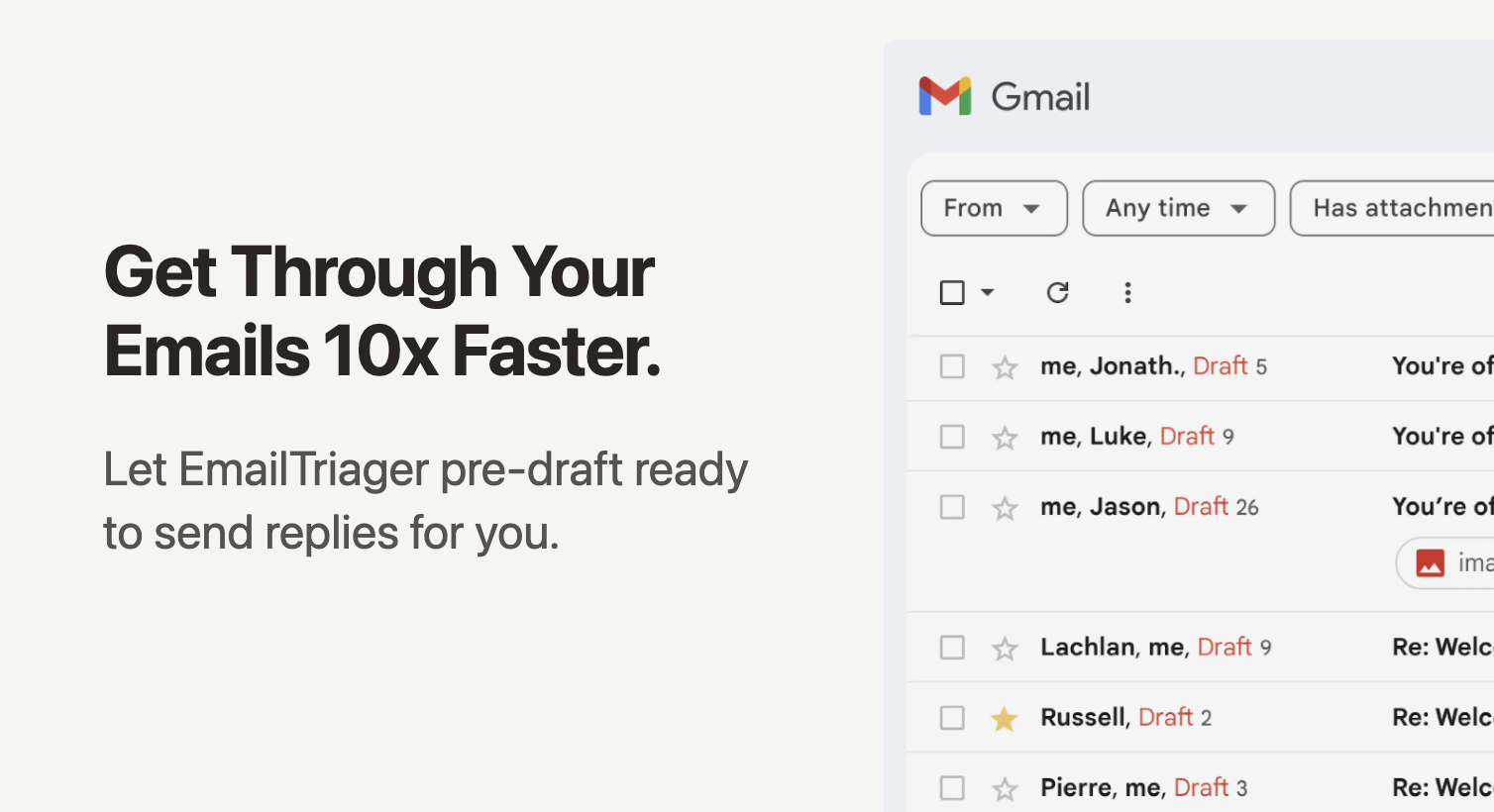
EmailTriager functions as an AI-powered email assistant, integrating directly into web-based email platforms via a browser extension. It analyzes incoming emails and, based on the user's historical correspondence, generates a draft reply that matches their individual writing style and preferred tone. Users can then review, edit, and send these drafts, transforming a time-consuming task into a quick, efficient process.
Pricing
Pricing Plans
Explore EmailTriager's capabilities with a limited free trial to experience AI-powered email drafting.
- 7 days access
- 10 AI reply drafts
Full access to all features on a monthly subscription, ideal for consistent high-volume email users.
- Unlimited AI reply drafts
- Advanced style learning
- Priority support
Get the best value with an annual subscription, offering all Pro features at a discounted rate.
- Unlimited AI reply drafts
- Advanced style learning
- Priority support
- Save 20% annually
Core Value Propositions
Significant Time Savings
Automates routine email reply drafting, allowing users to respond faster and dedicate more time to core responsibilities. This boosts overall daily productivity.
Consistent Brand Voice
Ensures all outbound email communication maintains a uniform tone and style, reinforcing brand identity. This is crucial for professional credibility and customer perception.
Enhanced Productivity
Reduces the cognitive load associated with email management, enabling users to process their inbox more efficiently. This leads to a less stressful and more focused workday.
Personalized Communication
Generates replies that sound authentically like the user, fostering stronger relationships through tailored interactions. This improves the quality of every email exchange.
Use Cases
Replying to Routine Inquiries
Quickly drafts responses to common questions, FAQs, or information requests, saving customer support teams significant time. This ensures prompt and consistent customer service.
Drafting Sales Follow-Up Emails
Generates personalized follow-ups after meetings or initial contacts, maintaining a consistent sales voice and increasing engagement. This helps nurture leads more efficiently.
Managing Customer Support Tickets
Assists support agents in drafting initial responses to tickets, ensuring timely communication while adhering to company guidelines. This improves response times and agent efficiency.
Responding to Internal Team Communications
Helps professionals quickly respond to internal requests, project updates, or team discussions. This fosters smoother internal collaboration and reduces communication bottlenecks.
Handling Appointment Confirmations
Automates the drafting of confirmation emails for appointments, meetings, or events. This ensures professionalism and reduces manual administrative tasks for busy individuals.
Technical Features & Integration
AI Style Learning
Learns your unique writing style, tone, and vocabulary from past emails to generate highly personalized and authentic replies. This ensures consistency across all communications.
Contextual Reply Generation
Analyzes the content of incoming emails to draft contextually relevant and accurate responses. This saves time by eliminating the need to manually craft each reply.
Browser Extension Integration
Works as a seamless extension for Chrome and Edge, integrating directly with web-based Gmail and Outlook. This provides a native experience within your existing email workflow.
Customizable Drafts
Provides editable AI-generated drafts, allowing users to fine-tune responses before sending. This maintains user control and ensures accuracy and personal touch.
Data Privacy & Security
Emphasizes that user data is encrypted and not used to train general AI models, adhering to GDPR standards. This builds trust and protects sensitive information.
Multi-Email Client Support
Supports popular webmail platforms including Gmail and Outlook. This broad compatibility makes it accessible to a wide range of professionals.
Target Audience
This tool is ideal for professionals, executives, sales teams, customer support representatives, and small business owners who spend significant time drafting emails. Anyone looking to enhance productivity, maintain a consistent brand voice, and reduce email-related workload will find EmailTriager highly beneficial.
Frequently Asked Questions
EmailTriager offers a free plan with limited features. Paid plans are available for additional features and capabilities. Available plans include: Free Trial, Pro Plan (Monthly), Pro Plan (Annually).
EmailTriager functions as an AI-powered email assistant, integrating directly into web-based email platforms via a browser extension. It analyzes incoming emails and, based on the user's historical correspondence, generates a draft reply that matches their individual writing style and preferred tone. Users can then review, edit, and send these drafts, transforming a time-consuming task into a quick, efficient process.
Key features of EmailTriager include: AI Style Learning: Learns your unique writing style, tone, and vocabulary from past emails to generate highly personalized and authentic replies. This ensures consistency across all communications.. Contextual Reply Generation: Analyzes the content of incoming emails to draft contextually relevant and accurate responses. This saves time by eliminating the need to manually craft each reply.. Browser Extension Integration: Works as a seamless extension for Chrome and Edge, integrating directly with web-based Gmail and Outlook. This provides a native experience within your existing email workflow.. Customizable Drafts: Provides editable AI-generated drafts, allowing users to fine-tune responses before sending. This maintains user control and ensures accuracy and personal touch.. Data Privacy & Security: Emphasizes that user data is encrypted and not used to train general AI models, adhering to GDPR standards. This builds trust and protects sensitive information.. Multi-Email Client Support: Supports popular webmail platforms including Gmail and Outlook. This broad compatibility makes it accessible to a wide range of professionals..
EmailTriager is best suited for This tool is ideal for professionals, executives, sales teams, customer support representatives, and small business owners who spend significant time drafting emails. Anyone looking to enhance productivity, maintain a consistent brand voice, and reduce email-related workload will find EmailTriager highly beneficial..
Automates routine email reply drafting, allowing users to respond faster and dedicate more time to core responsibilities. This boosts overall daily productivity.
Ensures all outbound email communication maintains a uniform tone and style, reinforcing brand identity. This is crucial for professional credibility and customer perception.
Reduces the cognitive load associated with email management, enabling users to process their inbox more efficiently. This leads to a less stressful and more focused workday.
Generates replies that sound authentically like the user, fostering stronger relationships through tailored interactions. This improves the quality of every email exchange.
Quickly drafts responses to common questions, FAQs, or information requests, saving customer support teams significant time. This ensures prompt and consistent customer service.
Generates personalized follow-ups after meetings or initial contacts, maintaining a consistent sales voice and increasing engagement. This helps nurture leads more efficiently.
Assists support agents in drafting initial responses to tickets, ensuring timely communication while adhering to company guidelines. This improves response times and agent efficiency.
Helps professionals quickly respond to internal requests, project updates, or team discussions. This fosters smoother internal collaboration and reduces communication bottlenecks.
Automates the drafting of confirmation emails for appointments, meetings, or events. This ensures professionalism and reduces manual administrative tasks for busy individuals.




Get new AI tools weekly
Join readers discovering the best AI tools every week.