

Descript
Last updated:
Descript is an innovative AI-powered audio and video editing platform that revolutionizes content creation by allowing users to edit media directly through its automatically generated transcript. This unique approach simplifies complex editing tasks, making professional-quality audio and video production accessible to a wider audience. It integrates a suite of AI tools, from noise reduction and filler word removal to AI voice generation and eye contact correction, streamlining post-production workflows for various content formats.
What It Does
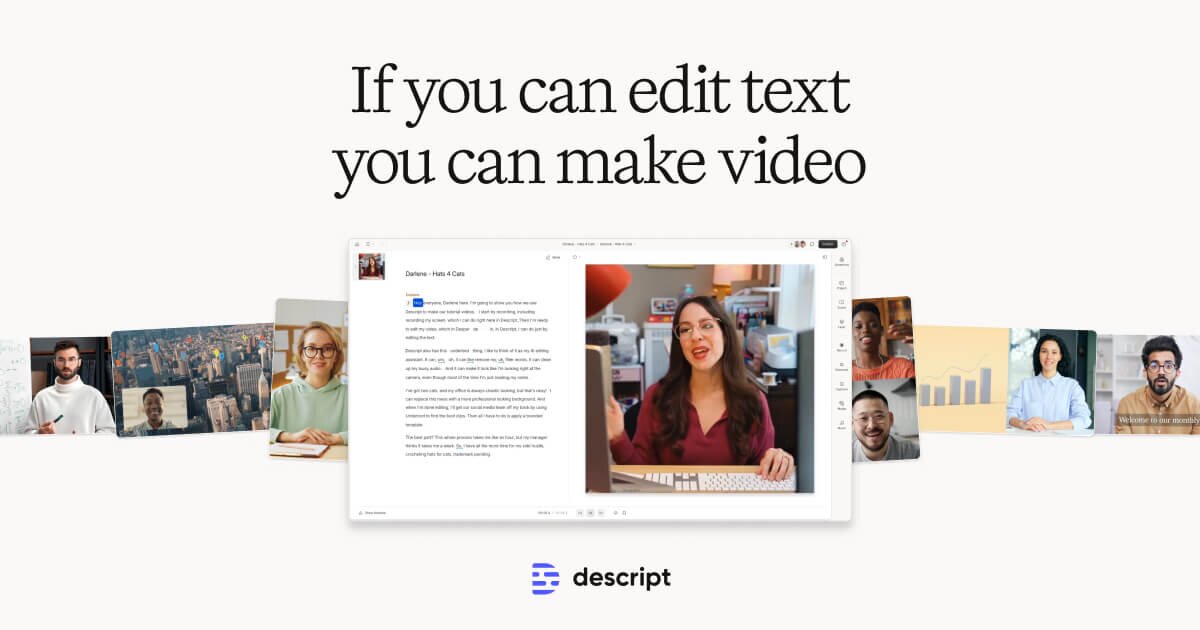
Descript's core functionality is its 'overdubbing' of audio and video editing onto text editing. Users upload media, which Descript transcribes with high accuracy. Editing the text (deleting words, reordering sentences) directly manipulates the corresponding audio and video clips. Beyond this, it offers traditional multi-track editing, screen recording, and a powerful array of AI features to enhance clarity, consistency, and creative possibilities.
Pricing
Pricing Plans
Ideal for trying out Descript's core features with basic editing and transcription limits.
- 1 hour of transcription
- 1 project
- Limited video export resolution
- Basic editing tools
Designed for individual creators needing more extensive editing and AI enhancement capabilities.
- 10 hours of transcription per month
- Unlimited projects
- Full video export resolution
- Studio Sound
- Filler Word Removal
- +1 more
For professionals and teams requiring advanced AI features and higher usage limits for comprehensive content production.
- 30 hours of transcription per month
- All Creator features
- Overdub (AI voice cloning)
- Eye Contact
- Audiograms
- +1 more
Tailored solutions for large organizations and teams with specific security, support, and usage requirements.
- Custom transcription hours
- Dedicated account representative
- SAML SSO
- Advanced security
- Centralized billing
Core Value Propositions
Streamlined Editing Workflow
Edit media by editing text, significantly reducing the time and complexity traditionally associated with audio and video post-production.
Professional Quality Output
Leverage advanced AI features like Studio Sound and filler word removal to automatically enhance audio and video to broadcast-ready standards.
Creative AI Tools
Utilize AI Green Screen, Eye Contact, and Overdub for innovative content creation, adding flexibility and creative possibilities without extra effort.
Accessibility for Non-Editors
Democratizes video and audio editing, making powerful tools accessible to anyone, regardless of prior experience with traditional editing software.
Use Cases
Podcast Editing & Production
Quickly edit podcast episodes by removing filler words, cutting silences, and enhancing audio quality with Studio Sound, making the process faster and more efficient.
YouTube Video Creation
Produce high-quality YouTube videos by editing transcripts, adding captions, and using AI features like Eye Contact and Green Screen for polished visual content.
Online Course & Tutorial Creation
Record and edit screen shares and webcam footage for educational content, easily refining spoken explanations and adding visual aids.
Marketing & Social Media Videos
Rapidly create engaging short-form videos for social media platforms by trimming content, adding text overlays, and leveraging AI for quick edits and enhancements.
Meeting & Interview Transcription
Transcribe important meetings or interviews, then easily edit the transcript to create concise summaries or extract key discussion points.
Repurposing Long-Form Content
Transform webinars, podcasts, or long videos into bite-sized clips for various platforms, using text-based editing to pinpoint and extract key segments.
Technical Features & Integration
Text-Based Editing
Edit audio and video by simply editing the automatically generated transcript, making media manipulation as intuitive as editing a document.
Studio Sound
Enhance audio quality significantly by removing background noise, room echo, and optimizing speech, making recordings sound professionally produced.
Overdub & AI Voices
Generate new speech in your own voice using AI, or choose from stock AI voices to add or correct dialogue without re-recording.
Filler Word Removal
Automatically detect and remove common filler words like 'um,' 'uh,' 'you know,' and repeated words with a single click, improving flow and conciseness.
AI Green Screen
Remove and replace video backgrounds without the need for a physical green screen, offering flexibility in visual presentation.
Eye Contact Correction
Adjust the speaker's gaze in video recordings to maintain direct eye contact with the camera, enhancing engagement and professionalism.
Screen & Camera Recording
Capture screen recordings, webcam footage, or both simultaneously, ideal for tutorials, presentations, and remote collaboration.
Multi-Track Editing
Combine and edit multiple audio and video tracks, offering a comprehensive suite of tools for complex projects like podcasts and documentaries.
Target Audience
Descript primarily serves content creators, podcasters, YouTubers, marketers, educators, and businesses who regularly produce audio and video content. It's ideal for anyone looking to streamline their post-production workflow, enhance media quality with AI, and simplify complex editing tasks, regardless of their technical editing expertise.
Frequently Asked Questions
Descript offers a free plan with limited features. Paid plans are available for additional features and capabilities. Available plans include: Free, Creator, Pro, Enterprise.
Descript's core functionality is its 'overdubbing' of audio and video editing onto text editing. Users upload media, which Descript transcribes with high accuracy. Editing the text (deleting words, reordering sentences) directly manipulates the corresponding audio and video clips. Beyond this, it offers traditional multi-track editing, screen recording, and a powerful array of AI features to enhance clarity, consistency, and creative possibilities.
Key features of Descript include: Text-Based Editing: Edit audio and video by simply editing the automatically generated transcript, making media manipulation as intuitive as editing a document.. Studio Sound: Enhance audio quality significantly by removing background noise, room echo, and optimizing speech, making recordings sound professionally produced.. Overdub & AI Voices: Generate new speech in your own voice using AI, or choose from stock AI voices to add or correct dialogue without re-recording.. Filler Word Removal: Automatically detect and remove common filler words like 'um,' 'uh,' 'you know,' and repeated words with a single click, improving flow and conciseness.. AI Green Screen: Remove and replace video backgrounds without the need for a physical green screen, offering flexibility in visual presentation.. Eye Contact Correction: Adjust the speaker's gaze in video recordings to maintain direct eye contact with the camera, enhancing engagement and professionalism.. Screen & Camera Recording: Capture screen recordings, webcam footage, or both simultaneously, ideal for tutorials, presentations, and remote collaboration.. Multi-Track Editing: Combine and edit multiple audio and video tracks, offering a comprehensive suite of tools for complex projects like podcasts and documentaries..
Descript is best suited for Descript primarily serves content creators, podcasters, YouTubers, marketers, educators, and businesses who regularly produce audio and video content. It's ideal for anyone looking to streamline their post-production workflow, enhance media quality with AI, and simplify complex editing tasks, regardless of their technical editing expertise..
Edit media by editing text, significantly reducing the time and complexity traditionally associated with audio and video post-production.
Leverage advanced AI features like Studio Sound and filler word removal to automatically enhance audio and video to broadcast-ready standards.
Utilize AI Green Screen, Eye Contact, and Overdub for innovative content creation, adding flexibility and creative possibilities without extra effort.
Democratizes video and audio editing, making powerful tools accessible to anyone, regardless of prior experience with traditional editing software.
Quickly edit podcast episodes by removing filler words, cutting silences, and enhancing audio quality with Studio Sound, making the process faster and more efficient.
Produce high-quality YouTube videos by editing transcripts, adding captions, and using AI features like Eye Contact and Green Screen for polished visual content.
Record and edit screen shares and webcam footage for educational content, easily refining spoken explanations and adding visual aids.
Rapidly create engaging short-form videos for social media platforms by trimming content, adding text overlays, and leveraging AI for quick edits and enhancements.
Transcribe important meetings or interviews, then easily edit the transcript to create concise summaries or extract key discussion points.
Transform webinars, podcasts, or long videos into bite-sized clips for various platforms, using text-based editing to pinpoint and extract key segments.


Get new AI tools weekly
Join readers discovering the best AI tools every week.