
Cleanup Pictures
Last updated:
Cleanup Pictures is an intuitive AI-powered web platform designed to effortlessly remove unwanted objects, text, people, or defects from images. It simplifies complex photo retouching tasks, allowing users to achieve clean and professional-looking pictures quickly without the need for advanced editing software or specialized skills. The tool focuses on providing a seamless user experience for image enhancement, making professional-grade cleanup accessible to a broad audience.
What It Does
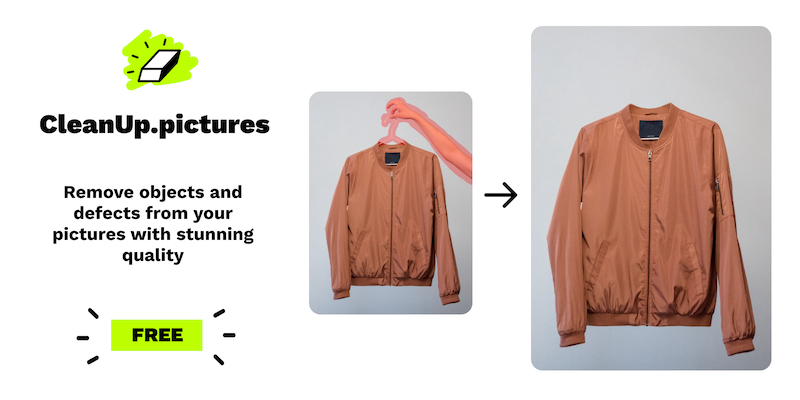
Users simply upload an image to the platform, select a brush tool, and paint over the unwanted elements they wish to remove. The underlying AI algorithm then intelligently analyzes the surrounding pixels and generates a seamless fill, effectively making the selected object disappear as if it was never there. This process works for various imperfections, from small blemishes to larger background distractions.
Pricing
Pricing Plans
Basic functionality for casual users, suitable for smaller image cleanups.
- Unlimited use
- Up to 720px resolution output
- Limited history
Full access to all features, ideal for regular users and professionals needing high-resolution output and advanced capabilities.
- Unlimited use
- Up to 7680x7680px resolution output
- Unlimited history
- Batch processing
- API access
- +1 more
Annual subscription offering the best value for professionals and businesses requiring consistent, high-volume image cleanup.
- Unlimited use
- Up to 7680x7680px resolution output
- Unlimited history
- Batch processing
- API access
- +2 more
Core Value Propositions
Effortless Object Removal
Quickly erase distractions from photos with a simple brush, saving significant time compared to manual editing.
Professional-Grade Results
Achieve clean, polished images that look professionally retouched, enhancing visual quality for any purpose.
Accessibility for All Users
No complex software or advanced skills required, making powerful image editing accessible to everyone.
Streamlined Workflow
Process images efficiently in a web browser, reducing friction and speeding up content creation or image preparation.
Use Cases
Remove Photobombers from Photos
Effortlessly erase unwanted people or objects from personal vacation or event photos, making memories perfect.
Clean Up E-commerce Product Shots
Remove dust, wires, reflections, or other distractions from product images to present items more professionally.
Retouch Portraits and Selfies
Smooth skin, remove blemishes, stray hairs, or unwanted background elements for flawless portrait photography.
Declutter Real Estate Listings
Erase personal items, furniture, or other temporary clutter from property photos to enhance their appeal to buyers.
Erase Text or Watermarks
Remove unwanted text, logos, or watermarks from images (with appropriate rights) for cleaner visual content.
Prepare Marketing Materials
Quickly refine images for social media, advertisements, or website banners by removing distracting elements.
Technical Features & Integration
AI-Powered Object Removal
Utilizes advanced AI to intelligently remove unwanted elements like objects, text, or people, seamlessly filling the gaps with contextual content.
Intuitive Brush Interface
Offers a simple, user-friendly brush tool for precise selection of areas to be cleaned, making the process accessible to all skill levels.
High-Resolution Support
Processes images up to 7680x7680 pixels for Pro users, ensuring high-quality output suitable for professional applications.
Batch Processing
Allows Pro users to process multiple images at once, significantly speeding up workflows for large volumes of photos.
API Access
Provides an API for developers and businesses to integrate Cleanup Pictures' functionality directly into their own applications or services.
Privacy-Focused Design
Images are processed and typically not stored long-term, ensuring user data privacy and security.
Mobile Compatibility
Optimized for use on mobile devices, allowing users to clean up pictures directly from their smartphones or tablets.
Target Audience
This tool is ideal for photographers (amateur and professional), graphic designers, e-commerce businesses, real estate agents, social media managers, and content creators. Anyone needing to quickly and efficiently remove unwanted elements from images without investing in complex software will find it invaluable.
Frequently Asked Questions
Cleanup Pictures offers a free plan with limited features. Paid plans are available for additional features and capabilities. Available plans include: Free, Pro Monthly, Pro Yearly.
Users simply upload an image to the platform, select a brush tool, and paint over the unwanted elements they wish to remove. The underlying AI algorithm then intelligently analyzes the surrounding pixels and generates a seamless fill, effectively making the selected object disappear as if it was never there. This process works for various imperfections, from small blemishes to larger background distractions.
Key features of Cleanup Pictures include: AI-Powered Object Removal: Utilizes advanced AI to intelligently remove unwanted elements like objects, text, or people, seamlessly filling the gaps with contextual content.. Intuitive Brush Interface: Offers a simple, user-friendly brush tool for precise selection of areas to be cleaned, making the process accessible to all skill levels.. High-Resolution Support: Processes images up to 7680x7680 pixels for Pro users, ensuring high-quality output suitable for professional applications.. Batch Processing: Allows Pro users to process multiple images at once, significantly speeding up workflows for large volumes of photos.. API Access: Provides an API for developers and businesses to integrate Cleanup Pictures' functionality directly into their own applications or services.. Privacy-Focused Design: Images are processed and typically not stored long-term, ensuring user data privacy and security.. Mobile Compatibility: Optimized for use on mobile devices, allowing users to clean up pictures directly from their smartphones or tablets..
Cleanup Pictures is best suited for This tool is ideal for photographers (amateur and professional), graphic designers, e-commerce businesses, real estate agents, social media managers, and content creators. Anyone needing to quickly and efficiently remove unwanted elements from images without investing in complex software will find it invaluable..
Quickly erase distractions from photos with a simple brush, saving significant time compared to manual editing.
Achieve clean, polished images that look professionally retouched, enhancing visual quality for any purpose.
No complex software or advanced skills required, making powerful image editing accessible to everyone.
Process images efficiently in a web browser, reducing friction and speeding up content creation or image preparation.
Effortlessly erase unwanted people or objects from personal vacation or event photos, making memories perfect.
Remove dust, wires, reflections, or other distractions from product images to present items more professionally.
Smooth skin, remove blemishes, stray hairs, or unwanted background elements for flawless portrait photography.
Erase personal items, furniture, or other temporary clutter from property photos to enhance their appeal to buyers.
Remove unwanted text, logos, or watermarks from images (with appropriate rights) for cleaner visual content.
Quickly refine images for social media, advertisements, or website banners by removing distracting elements.




Get new AI tools weekly
Join readers discovering the best AI tools every week.