

Camp For Macos
Last updated:
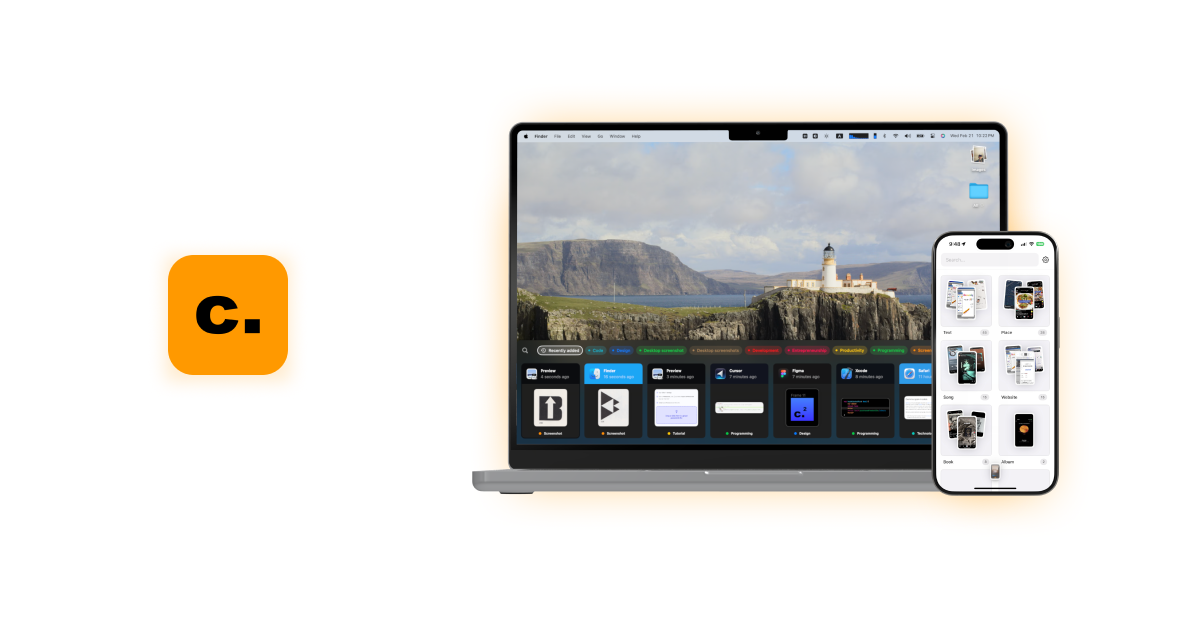
Camp For Macos is an AI-powered screen capturing and organization tool exclusively for macOS and iOS users. It intelligently automates the tagging and categorization of screenshots using on-device AI and OCR, transforming chaotic visual data into an easily searchable and manageable database. This significantly enhances productivity by streamlining the capture, organization, and retrieval of visual information across Apple's ecosystem for professionals, students, and researchers alike.
What It Does
Camp For Macos captures screenshots and instantly processes them using on-device AI and OCR to extract context, text, and objects. It then automatically tags and categorizes these visual assets, creating a smart, searchable library. Users can quickly find specific information through natural language queries or by browsing intelligent collections, eliminating manual sorting and improving information retrieval.
Pricing
Pricing Plans
Get full access to all Camp for macOS features with a single, one-time payment, including all future updates.
- AI Auto-Tagging & Categorization
- Natural Language Search
- OCR (Search Text in Images)
- Smart Folders
- Cross-Device Sync (macOS & iOS)
- +2 more
Core Value Propositions
Effortless Screenshot Organization
Automatically tags and categorizes all your screenshots, eliminating manual sorting and keeping your visual library tidy without user intervention.
Instant Visual Information Retrieval
Find any screenshot in seconds using natural language or text within images, drastically cutting down search time and improving efficiency.
Enhanced Productivity Workflow
Streamlines the process of capturing, organizing, and accessing visual data, allowing users to focus more on tasks rather than managing files.
Guaranteed Data Privacy
All AI processing and data storage occur locally on your device, ensuring your sensitive screenshots and information remain completely private.
Use Cases
Software Bug Reporting
Developers can quickly capture and auto-tag screenshots of bugs, making it easy to find and attach relevant visuals to bug reports.
Design Feedback & Iteration
Designers can collect UI/UX inspirations or feedback, with AI organizing them for easy reference during design reviews and iterations.
Academic Research & Note-Taking
Students and researchers can capture relevant information from articles or presentations, knowing it will be automatically organized and searchable for later study.
Tutorial & Documentation Creation
Content creators can effortlessly manage screenshots for step-by-step guides, ensuring all visuals are tagged and ready for inclusion in documentation.
Project Management & Collaboration
Project managers can gather visual updates or reference materials, quickly sharing specific screenshots with team members for clarity and alignment.
Technical Features & Integration
AI Auto-Tagging & Categorization
Automatically assigns relevant tags and categorizes screenshots based on their content, saving significant time and effort in manual organization.
Natural Language Search
Allows users to find specific screenshots using descriptive phrases, making retrieval intuitive and efficient without needing exact keywords.
Optical Character Recognition (OCR)
Enables searching for text contained within screenshots, turning visual information into searchable data for quick access.
Smart Folders
Automatically organizes screenshots into dynamic folders based on criteria like application, date, or custom rules, maintaining order effortlessly.
Cross-Device Synchronization
Ensures all screenshots and their organizational data are seamlessly available and consistent across both macOS and iOS devices.
On-Device Data Privacy
Processes all screenshot data locally on your device, ensuring sensitive visual information remains private and secure without cloud uploads.
Target Audience
This tool is ideal for professionals, students, researchers, designers, and developers who frequently capture and need to organize visual information on Apple devices. Anyone seeking to reduce digital clutter, enhance productivity, and quickly retrieve specific visual data will benefit significantly.
Frequently Asked Questions
Camp For Macos is a paid tool. Available plans include: One-time Purchase.
Camp For Macos captures screenshots and instantly processes them using on-device AI and OCR to extract context, text, and objects. It then automatically tags and categorizes these visual assets, creating a smart, searchable library. Users can quickly find specific information through natural language queries or by browsing intelligent collections, eliminating manual sorting and improving information retrieval.
Key features of Camp For Macos include: AI Auto-Tagging & Categorization: Automatically assigns relevant tags and categorizes screenshots based on their content, saving significant time and effort in manual organization.. Natural Language Search: Allows users to find specific screenshots using descriptive phrases, making retrieval intuitive and efficient without needing exact keywords.. Optical Character Recognition (OCR): Enables searching for text contained within screenshots, turning visual information into searchable data for quick access.. Smart Folders: Automatically organizes screenshots into dynamic folders based on criteria like application, date, or custom rules, maintaining order effortlessly.. Cross-Device Synchronization: Ensures all screenshots and their organizational data are seamlessly available and consistent across both macOS and iOS devices.. On-Device Data Privacy: Processes all screenshot data locally on your device, ensuring sensitive visual information remains private and secure without cloud uploads..
Camp For Macos is best suited for This tool is ideal for professionals, students, researchers, designers, and developers who frequently capture and need to organize visual information on Apple devices. Anyone seeking to reduce digital clutter, enhance productivity, and quickly retrieve specific visual data will benefit significantly..
Automatically tags and categorizes all your screenshots, eliminating manual sorting and keeping your visual library tidy without user intervention.
Find any screenshot in seconds using natural language or text within images, drastically cutting down search time and improving efficiency.
Streamlines the process of capturing, organizing, and accessing visual data, allowing users to focus more on tasks rather than managing files.
All AI processing and data storage occur locally on your device, ensuring your sensitive screenshots and information remain completely private.
Developers can quickly capture and auto-tag screenshots of bugs, making it easy to find and attach relevant visuals to bug reports.
Designers can collect UI/UX inspirations or feedback, with AI organizing them for easy reference during design reviews and iterations.
Students and researchers can capture relevant information from articles or presentations, knowing it will be automatically organized and searchable for later study.
Content creators can effortlessly manage screenshots for step-by-step guides, ensuring all visuals are tagged and ready for inclusion in documentation.
Project managers can gather visual updates or reference materials, quickly sharing specific screenshots with team members for clarity and alignment.



Get new AI tools weekly
Join readers discovering the best AI tools every week.