

Baron AI
Last updated:
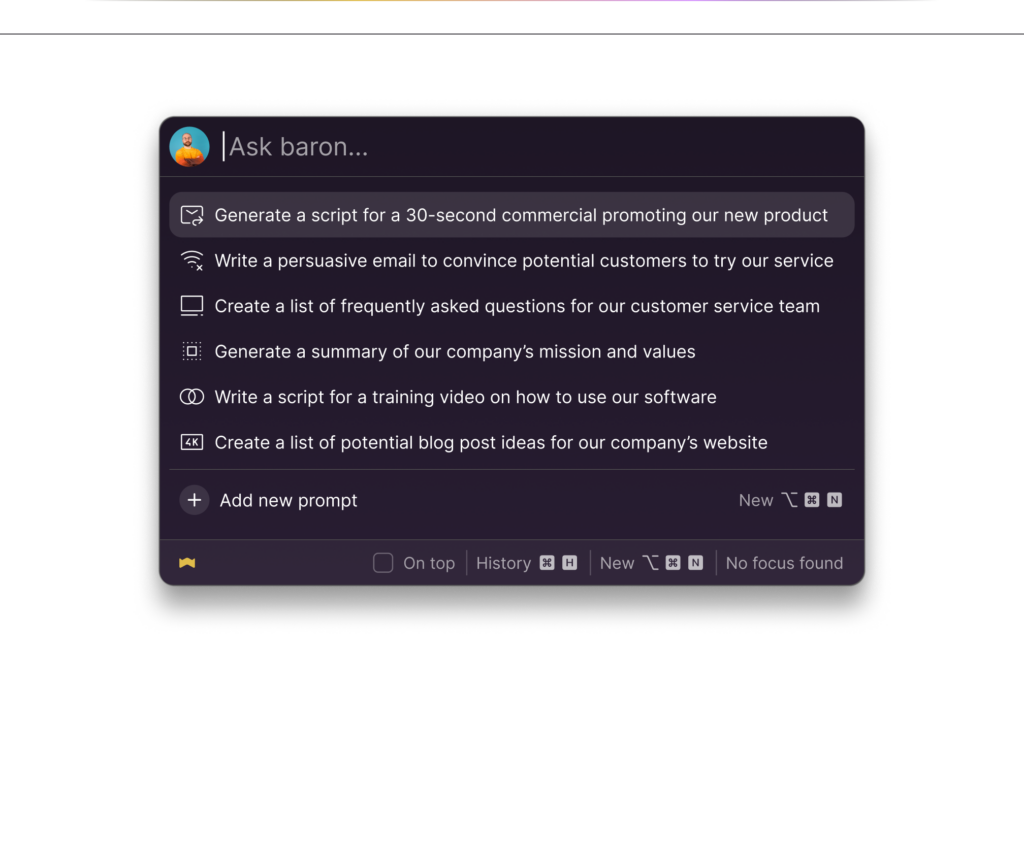
Baron AI is a robust desktop application for macOS and Windows designed to deeply integrate ChatGPT into a user's daily workflow. It provides instant, hotkey-driven access to AI capabilities, significantly enhancing productivity by eliminating the need to switch browser tabs. The tool centralizes prompt management and maintains a comprehensive chat history, ensuring users can quickly leverage AI for various tasks without breaking their focus.
What It Does
Baron AI functions as a local client for ChatGPT, allowing users to invoke an AI chat window anywhere on their desktop with a simple hotkey. It facilitates rapid interaction with OpenAI's models by enabling users to manage a library of custom prompts and review past conversations. This streamlined approach brings the power of AI directly into any application or workflow, from writing and coding to brainstorming and summarizing.
Pricing
Pricing Plans
A one-time purchase granting lifetime access to Baron AI, including all future updates and unlimited usage for seamless AI integration.
- All future updates
- Unlimited usage
- Hotkey instant access
- Prompt management
- Chat history
- +2 more
Core Value Propositions
Seamless Workflow Integration
Access AI instantly from any application, eliminating context switching and integrating AI assistance directly into your current task.
Enhanced Productivity & Speed
Save time with hotkey access, prompt management, and quick actions, allowing for faster iteration and completion of AI-assisted tasks.
Centralized Prompt & Chat Management
Organize and reuse prompts efficiently, while maintaining a searchable history of all AI conversations for better continuity and reference.
Improved Data Privacy
All your chat history and prompt data are stored locally on your device, giving you greater control and peace of mind over your information.
Use Cases
Drafting Emails & Documents
Quickly generate email drafts, refine sentences in a document, or brainstorm content ideas directly within your word processor or email client.
Coding Assistance & Debugging
Request code snippets, explain complex functions, or get debugging help from AI without leaving your integrated development environment (IDE).
Summarizing & Researching
Instantly summarize selected text from articles, PDFs, or web pages, or ask follow-up questions for deeper research while staying in your browser.
Content Creation & Ideation
Generate creative ideas for marketing copy, social media posts, or blog topics, leveraging AI's brainstorming capabilities on demand.
Language Translation & Rephrasing
Translate text snippets or rephrase sentences for clarity and improved style in any application, enhancing communication efficiency.
Learning & Explanations
Ask for explanations of complex concepts, definitions, or tutorials while studying or working, receiving instant insights from the AI.
Technical Features & Integration
Hotkey Instant Access
Summon the AI chat window instantly from any application using a customizable hotkey, eliminating context switching and saving valuable time.
Advanced Prompt Management
Create, save, categorize, and search a personal library of prompts, making it easy to recall and reuse effective AI queries for consistent results.
Persistent Chat History
All conversations are automatically saved and searchable, providing a complete record of AI interactions for future reference and continuity.
Customizable AI Models
Choose between different OpenAI models (e.g., GPT-3.5, GPT-4) and adjust parameters like temperature to tailor AI responses to specific needs.
Local Data Storage
All chat data and prompt libraries are stored locally on your device, offering enhanced privacy and control over your information.
Quick Actions
Utilize pre-defined actions for common AI tasks such as summarizing selected text, rephrasing content, or expanding on ideas with a single click.
Target Audience
Baron AI is ideal for professionals across various fields, including writers, developers, marketers, students, and general business users who frequently interact with AI. Anyone seeking to integrate ChatGPT more seamlessly into their daily desktop workflow, enhance productivity, and manage their AI interactions efficiently will benefit from this tool.
Frequently Asked Questions
Baron AI is a paid tool. Available plans include: Lifetime License.
Baron AI functions as a local client for ChatGPT, allowing users to invoke an AI chat window anywhere on their desktop with a simple hotkey. It facilitates rapid interaction with OpenAI's models by enabling users to manage a library of custom prompts and review past conversations. This streamlined approach brings the power of AI directly into any application or workflow, from writing and coding to brainstorming and summarizing.
Key features of Baron AI include: Hotkey Instant Access: Summon the AI chat window instantly from any application using a customizable hotkey, eliminating context switching and saving valuable time.. Advanced Prompt Management: Create, save, categorize, and search a personal library of prompts, making it easy to recall and reuse effective AI queries for consistent results.. Persistent Chat History: All conversations are automatically saved and searchable, providing a complete record of AI interactions for future reference and continuity.. Customizable AI Models: Choose between different OpenAI models (e.g., GPT-3.5, GPT-4) and adjust parameters like temperature to tailor AI responses to specific needs.. Local Data Storage: All chat data and prompt libraries are stored locally on your device, offering enhanced privacy and control over your information.. Quick Actions: Utilize pre-defined actions for common AI tasks such as summarizing selected text, rephrasing content, or expanding on ideas with a single click..
Baron AI is best suited for Baron AI is ideal for professionals across various fields, including writers, developers, marketers, students, and general business users who frequently interact with AI. Anyone seeking to integrate ChatGPT more seamlessly into their daily desktop workflow, enhance productivity, and manage their AI interactions efficiently will benefit from this tool..
Access AI instantly from any application, eliminating context switching and integrating AI assistance directly into your current task.
Save time with hotkey access, prompt management, and quick actions, allowing for faster iteration and completion of AI-assisted tasks.
Organize and reuse prompts efficiently, while maintaining a searchable history of all AI conversations for better continuity and reference.
All your chat history and prompt data are stored locally on your device, giving you greater control and peace of mind over your information.
Quickly generate email drafts, refine sentences in a document, or brainstorm content ideas directly within your word processor or email client.
Request code snippets, explain complex functions, or get debugging help from AI without leaving your integrated development environment (IDE).
Instantly summarize selected text from articles, PDFs, or web pages, or ask follow-up questions for deeper research while staying in your browser.
Generate creative ideas for marketing copy, social media posts, or blog topics, leveraging AI's brainstorming capabilities on demand.
Translate text snippets or rephrase sentences for clarity and improved style in any application, enhancing communication efficiency.
Ask for explanations of complex concepts, definitions, or tutorials while studying or working, receiving instant insights from the AI.






Get new AI tools weekly
Join readers discovering the best AI tools every week.