
Akiflow
Last updated:
Akiflow is an advanced digital planner and productivity hub designed to centralize and streamline task management, scheduling, and daily planning. It unifies tasks and meetings from across various tools into a single, intuitive inbox and calendar, enabling users to time-block effectively and optimize their workflow. With robust integrations and AI-powered features, Akiflow acts as a command center for individuals and teams seeking to overcome context switching and enhance overall productivity.
What It Does
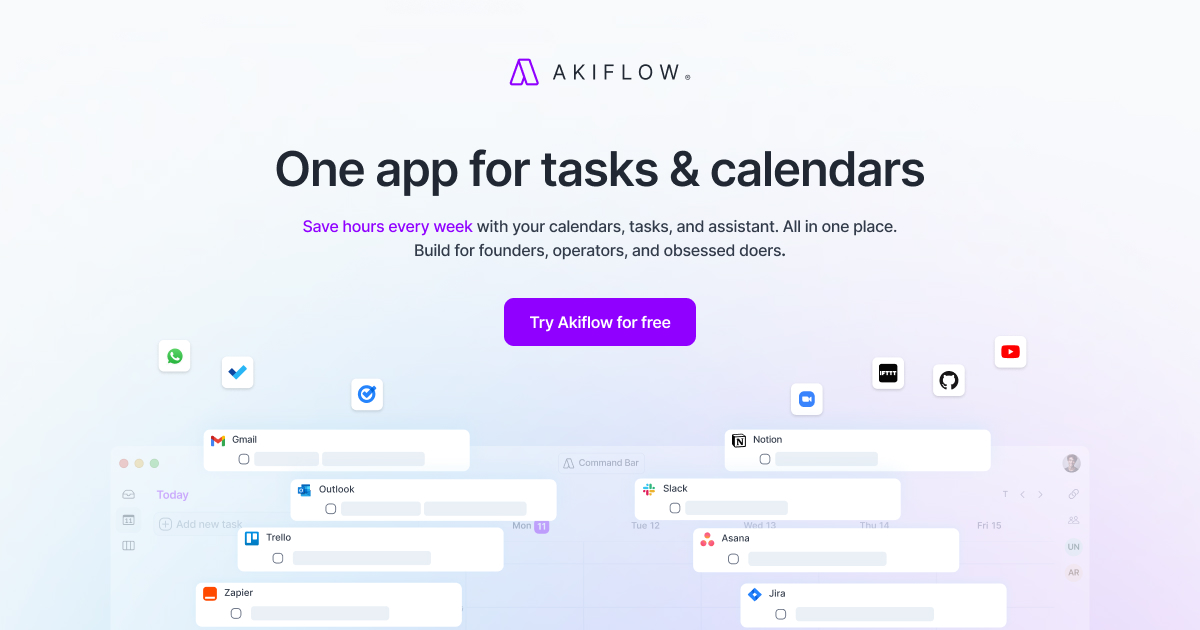
Akiflow consolidates tasks, events, and communications from numerous external applications into a unified interface, presenting them on an interactive calendar. Users can drag and drop tasks onto their calendar for time blocking, prioritize their workload, and leverage AI to summarize meetings or generate daily plans. This allows for a comprehensive overview and proactive management of one's entire professional and personal schedule.
Pricing
Pricing Plans
Access to all Akiflow features, billed on a month-to-month basis.
- Unified Inbox
- Time Blocking
- 30+ Integrations
- Akiflow AI
- Keyboard Shortcuts
- +1 more
Access to all Akiflow features at a discounted rate when billed annually.
- Unified Inbox
- Time Blocking
- 30+ Integrations
- Akiflow AI
- Keyboard Shortcuts
- +1 more
Core Value Propositions
Centralized Workflow Management
Bring all tasks, meetings, and communications into one place, eliminating the need to constantly switch between different applications and platforms.
AI-Powered Productivity Boost
Utilize AI for smart meeting summaries, automated task generation, and personalized daily plan suggestions, saving time and improving decision-making.
Enhanced Focus and Time Blocking
Dedicate specific time slots for tasks on your calendar, reducing distractions and ensuring important work receives the necessary attention and focus.
Reduced Mental Overhead
Experience less stress and cognitive load by having a clear, unified overview of your commitments, allowing for more strategic planning and execution.
Use Cases
Daily Planning & Prioritization
Users drag tasks from various tools onto their calendar to block out time, ensuring critical work gets dedicated focus and reducing procrastination.
Project Task Integration
Project managers consolidate tasks from Asana, Jira, or Trello with their personal calendar, visualizing project timelines and individual contributions.
Freelance Client Management
Freelancers unify tasks, emails, and meetings from multiple clients into one dashboard, ensuring no deadline is missed and communication is streamlined.
Meeting Preparation & Follow-up
Integrate meeting invites with related tasks and leverage AI to summarize discussions, helping prepare effectively and ensure action items are captured.
Reducing Context Switching
Professionals who jump between email, chat, and project tools use Akiflow to centralize their workflow, minimizing disruptive shifts in focus throughout the day.
Technical Features & Integration
Unified Inbox & Integrations
Consolidate tasks and events from over 30 tools like Slack, Notion, Asana, Jira, Gmail, and various calendars into one central inbox, eliminating context switching.
Time Blocking & Daily Planning
Visually plan your day by dragging tasks directly onto your calendar, blocking out dedicated time slots to ensure focused work and effective scheduling.
Akiflow AI Assistant
Leverage AI to automatically summarize meeting notes, generate new tasks from conversations, and create personalized daily plans, boosting efficiency.
Fast Keyboard Shortcuts
Accelerate your workflow with a comprehensive set of keyboard shortcuts, allowing for quick task creation, scheduling, and navigation without touching the mouse.
Cross-Platform Sync
Access and manage your tasks and calendar seamlessly across Mac, Windows, Linux, iOS, and Android devices, ensuring your plan is always up-to-date.
Focus Mode
Minimize distractions with a dedicated focus mode that helps users concentrate on their current task by reducing notifications and other interruptions.
Target Audience
Akiflow is ideal for busy professionals, managers, freelancers, and remote workers who juggle multiple projects, meetings, and communication channels. It caters to individuals and small teams seeking to improve their personal productivity, reduce digital clutter, and gain better control over their time and tasks across disparate tools.
Frequently Asked Questions
Akiflow is a paid tool. Available plans include: Monthly, Yearly.
Akiflow consolidates tasks, events, and communications from numerous external applications into a unified interface, presenting them on an interactive calendar. Users can drag and drop tasks onto their calendar for time blocking, prioritize their workload, and leverage AI to summarize meetings or generate daily plans. This allows for a comprehensive overview and proactive management of one's entire professional and personal schedule.
Key features of Akiflow include: Unified Inbox & Integrations: Consolidate tasks and events from over 30 tools like Slack, Notion, Asana, Jira, Gmail, and various calendars into one central inbox, eliminating context switching.. Time Blocking & Daily Planning: Visually plan your day by dragging tasks directly onto your calendar, blocking out dedicated time slots to ensure focused work and effective scheduling.. Akiflow AI Assistant: Leverage AI to automatically summarize meeting notes, generate new tasks from conversations, and create personalized daily plans, boosting efficiency.. Fast Keyboard Shortcuts: Accelerate your workflow with a comprehensive set of keyboard shortcuts, allowing for quick task creation, scheduling, and navigation without touching the mouse.. Cross-Platform Sync: Access and manage your tasks and calendar seamlessly across Mac, Windows, Linux, iOS, and Android devices, ensuring your plan is always up-to-date.. Focus Mode: Minimize distractions with a dedicated focus mode that helps users concentrate on their current task by reducing notifications and other interruptions..
Akiflow is best suited for Akiflow is ideal for busy professionals, managers, freelancers, and remote workers who juggle multiple projects, meetings, and communication channels. It caters to individuals and small teams seeking to improve their personal productivity, reduce digital clutter, and gain better control over their time and tasks across disparate tools..
Bring all tasks, meetings, and communications into one place, eliminating the need to constantly switch between different applications and platforms.
Utilize AI for smart meeting summaries, automated task generation, and personalized daily plan suggestions, saving time and improving decision-making.
Dedicate specific time slots for tasks on your calendar, reducing distractions and ensuring important work receives the necessary attention and focus.
Experience less stress and cognitive load by having a clear, unified overview of your commitments, allowing for more strategic planning and execution.
Users drag tasks from various tools onto their calendar to block out time, ensuring critical work gets dedicated focus and reducing procrastination.
Project managers consolidate tasks from Asana, Jira, or Trello with their personal calendar, visualizing project timelines and individual contributions.
Freelancers unify tasks, emails, and meetings from multiple clients into one dashboard, ensuring no deadline is missed and communication is streamlined.
Integrate meeting invites with related tasks and leverage AI to summarize discussions, helping prepare effectively and ensure action items are captured.
Professionals who jump between email, chat, and project tools use Akiflow to centralize their workflow, minimizing disruptive shifts in focus throughout the day.


Get new AI tools weekly
Join readers discovering the best AI tools every week.